🧩 1. What is the difference between try-catch and try-finally blocks in .NET?
📌 Why this is asked:
To check foundational understanding of exception control flow.
✅ Answer:
-
try-catchis used to handle exceptions by catching and processing them. -
try-finallyis used when cleanup is needed regardless of success or failure (e.g., closing a file, releasing DB connections).
You can also combine both (try-catch-finally) for full control.
🎯 2. What happens if an exception is thrown and not caught?
📌 Why this is asked:
To evaluate your understanding of exception propagation and crash behavior.
✅ Answer:
If an exception is unhandled, the CLR will terminate the application (in .NET Framework) or bubble it up to the runtime (in ASP.NET Core). For web apps, it results in a 500 error. This is why proper exception logging and top-level handlers are essential.
📦 3. What is the purpose of custom exceptions in .NET?
📌 Why this is asked:
To see if you know how to make your error reporting more meaningful and maintainable.
✅ Answer:
Custom exceptions allow you to define domain-specific errors (e.g., InsufficientFundsException) that make the code more readable and easier to handle. They should inherit from Exception and follow best practices like being serializable and including helpful constructors.
🛡️ 4. How do you implement global exception handling in ASP.NET Core?
📌 Why this is asked:
To evaluate your skills in centralized error logging and graceful failure.
✅ Answer:
In ASP.NET Core, I use a custom middleware or the built-in UseExceptionHandler() method to catch and log unhandled exceptions globally. In custom middleware, I log errors and return consistent JSON responses with HTTP status codes.
🧪 5. How do you rethrow an exception without losing the original stack trace?
📌 Why this is asked:
To test your depth in preserving diagnostics info for debugging.
✅ Answer:
You should use throw; (not throw ex;) to rethrow an exception and preserve the original stack trace. Using throw ex; resets the stack trace, making debugging harder.
🧯 6. What’s the difference between Exception, SystemException, and ApplicationException?
📌 Why this is asked:
To test knowledge of the .NET exception hierarchy.
✅ Answer:
-
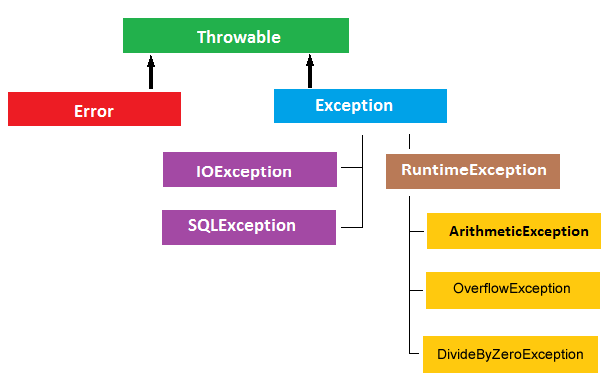
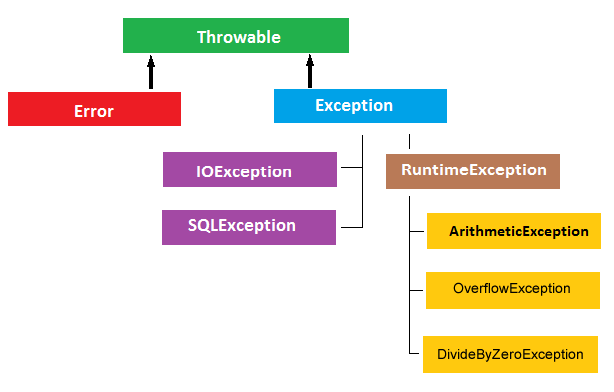
Exceptionis the base class for all exceptions. -
SystemExceptionincludes runtime errors (e.g.,NullReferenceException,IndexOutOfRangeException). -
ApplicationExceptionwas intended to group app-level exceptions, but it's rarely used today. It's better to create your own custom exceptions directly fromException.
📉 7. What is the best way to handle exceptions in a layered application (e.g., API → Service → Data)?
📌 Why this is asked:
To assess your architectural approach to error handling.
✅ Answer:
-
Data layer: Catch DB-related exceptions and throw domain-friendly messages.
-
Service layer: Handle business logic exceptions and wrap as needed.
-
API layer: Catch all unhandled exceptions with global exception handling, log them, and return proper HTTP responses. I avoid catching exceptions unless I can meaningfully act on them or add context.
🚀 8. How do you log exceptions effectively in .NET applications?
📌 Why this is asked:
To see if you apply observability and traceability in production code.
✅ Answer:
I use structured logging with tools like Serilog, NLog, or Application Insights. I log exception type, message, stack trace, correlation ID, and relevant context. I avoid logging sensitive info and use log levels (Error, Critical, Warning) appropriately.
🔐 9. How do you handle exceptions in async methods?
📌 Why this is asked:
To confirm understanding of exception handling in asynchronous flows.
✅ Answer:
I wrap await calls in try/catch blocks. If using fire-and-forget tasks, I ensure they’re wrapped in Task.Run() and exceptions are logged internally. Otherwise, unobserved exceptions can crash the process in background tasks.
💥 10. When would you throw an exception vs. returning a result (e.g., error code)?
📌 Why this is asked:
To assess your judgment on when to use exceptions vs. return values.
✅ Answer:
Throw exceptions for exceptional situations — things that break expected execution (e.g., invalid states, critical failures).
For expected flows, use result types (e.g., TryParse, Result<T>) to indicate success/failure without exception overhead.
I follow the “fail fast” principle and only throw when the app logic truly breaks.
Be the first to leave a comment!