

Building MCP Servers in C# — A Production Guide
Most MCP tutorials stop at "Hello, World." They show you how to register a tool, run the server, and declare victory. That's fine for demos. It's not fine when you're building something that needs to handle concurrent AI agents, survive restarts, and authenticate properly over HTTP.
This guide skips the happy path and goes straight to how MCP actually works in C# — the transport decision that bites everyone, the DI patterns that don't work the way you'd expect, and the failure modes that only surface under real load. I'll use the official ModelContextProtocol .NET SDK throughout.
What Is MCP? (Quick Answer)
- Model Context Protocol (MCP) is an open standard that lets AI models call external tools, read resources, and use reusable prompt templates — all over a structured JSON-RPC protocol.
- In .NET, you build an MCP server as a normal hosted service using ModelContextProtocol + ModelContextProtocol.AspNetCore from NuGet.
- The server exposes Tools (callable functions), Resources (data sources the model can read), and Prompts (templated message starters).
- Clients are AI agents — Claude Desktop, GitHub Copilot, or your own LLM pipeline — that discover and call your server automatically.
The Transport Decision You Must Make First
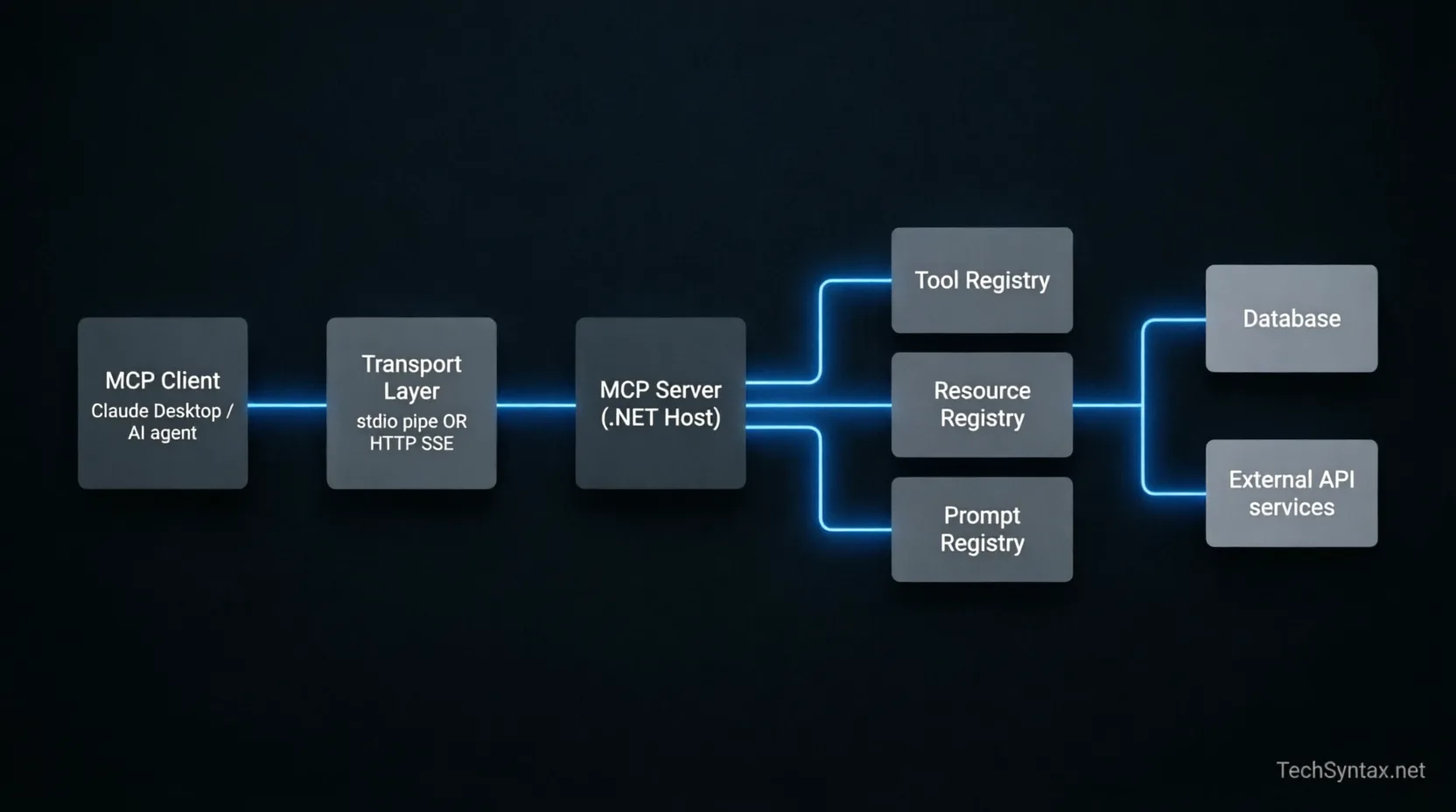
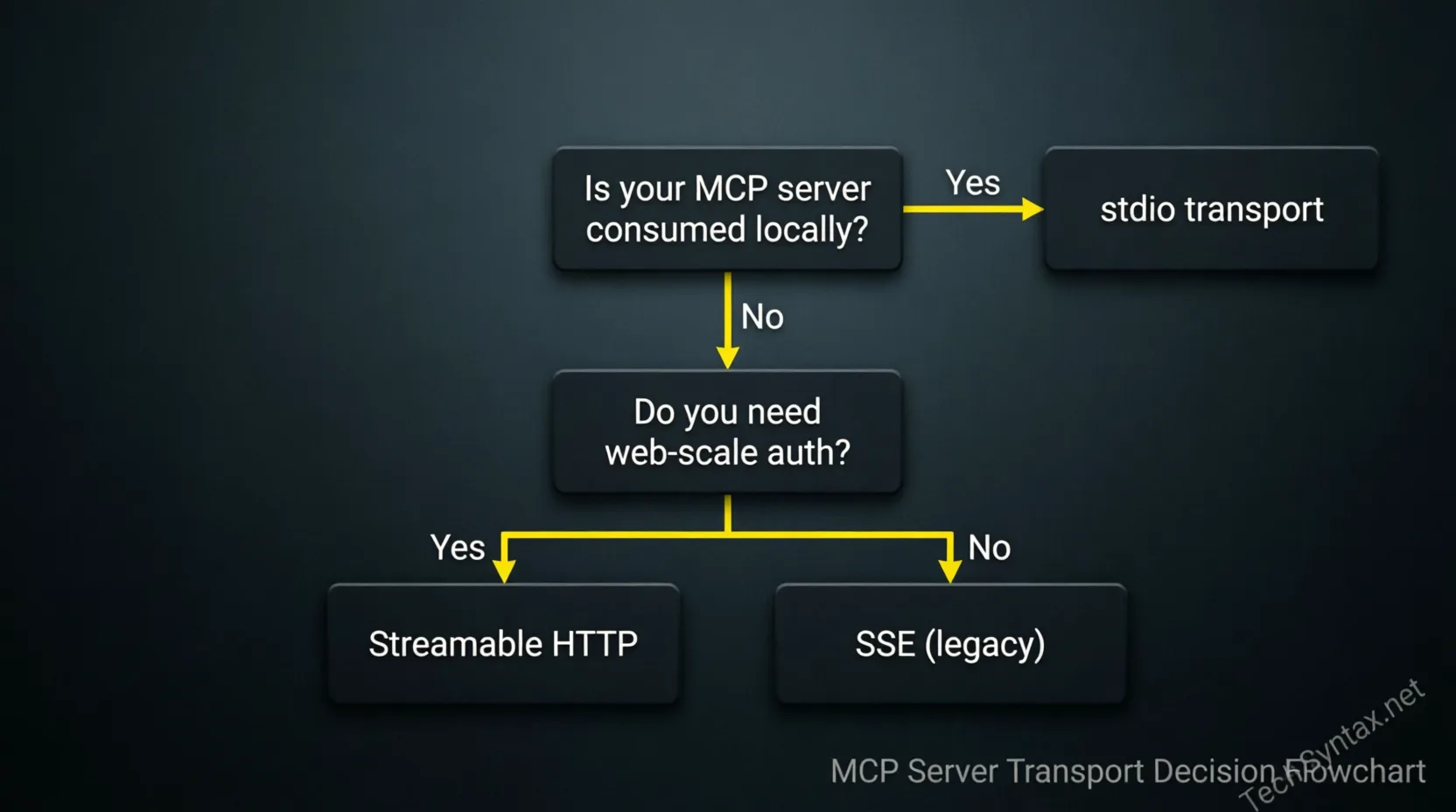
This is where most guides gloss over the most consequential choice in your MCP architecture. The transport layer determines everything: how your server is deployed, whether auth is possible, and what your failure modes look like.
| Transport | Use Case | Auth Support | Deployment | Gotcha |
|---|---|---|---|---|
| stdio | Local tools, Claude Desktop, dev workflows | None (process-level trust) | Local binary / npx-style | No multi-client support — one process per session |
| SSE (HTTP) | Legacy web deployment, single-tenant | Bearer token via headers | ASP.NET Core | Deprecated in MCP spec 2025-03; avoid for new builds |
| Streamable HTTP | Production, multi-tenant, cloud | Full HTTP auth (JWT, OAuth) | ASP.NET Core + container | Client support still catching up as of mid-2025 |
My rule of thumb: if the server talks to Claude Desktop or runs locally alongside a dev tool, use stdio. If it's a service that multiple AI agents hit over the network, use Streamable HTTP with proper auth.
Project Setup
Packages
# For a stdio server (console app)
dotnet add package ModelContextProtocol --prerelease
dotnet add package Microsoft.Extensions.Hosting

# For an HTTP server (ASP.NET Core)
dotnet add package ModelContextProtocol.AspNetCore --prereleasestdio Server — Minimal Host
using Microsoft.Extensions.DependencyInjection;
using Microsoft.Extensions.Hosting;
using ModelContextProtocol.Server;

var builder = Host.CreateApplicationBuilder(args);

builder.Services
    .AddMcpServer()
    .WithStdioServerTransport()
    .WithToolsFromAssembly(); // scans for [McpServerTool] in calling assembly

await builder.Build().RunAsync();That's the complete entrypoint. The host blocks on stdin, processes JSON-RPC messages from the client, and dispatches to your tool classes. There's no HTTP, no ports, no configuration needed — the client process spawns this binary and communicates via pipes.
HTTP Server — ASP.NET Core with Streamable HTTP
var builder = WebApplication.CreateBuilder(args);

builder.Services
    .AddMcpServer()
    .WithHttpServerTransport()   // Streamable HTTP, not SSE
    .WithToolsFromAssembly();

builder.Services.AddAuthentication().AddJwtBearer();
builder.Services.AddAuthorization();

var app = builder.Build();

app.UseAuthentication();
app.UseAuthorization();
app.MapMcp("/mcp");          // registers all MCP endpoints
app.Run();Defining Tools — The Right Way
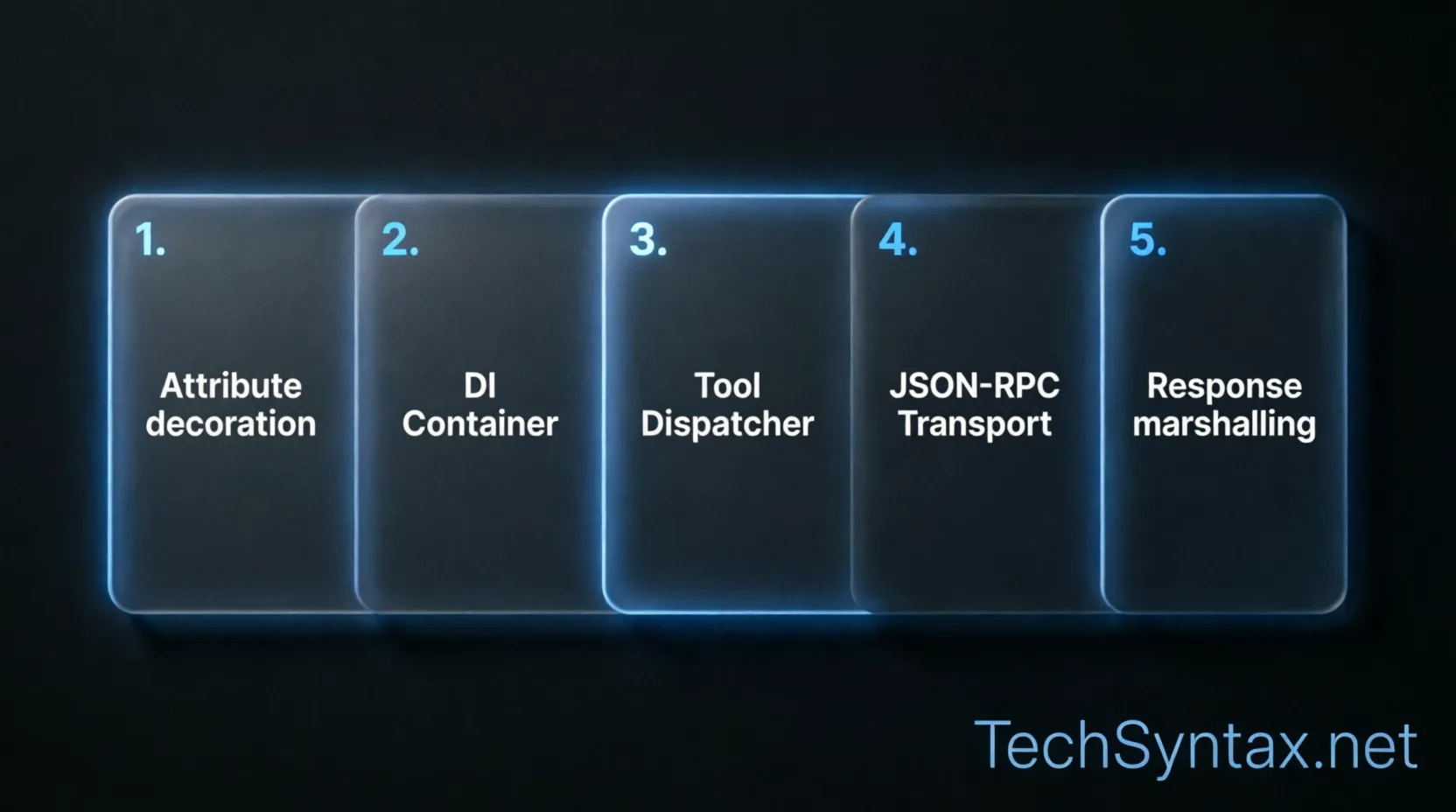
Tools are the most-used primitive. An AI model calls a tool when it needs to perform an action or fetch data it doesn't have. In the .NET SDK, you define tools as static or instance methods decorated with [McpServerTool].
Attribute Model
using ModelContextProtocol.Server;
using System.ComponentModel;

[McpServerToolType]
public class FinanceTools
{
    private readonly ITransactionRepository _repo;

    // DI via constructor — the SDK calls new() through the DI container
    public FinanceTools(ITransactionRepository repo) => _repo = repo;

    [McpServerTool]
    [Description("Returns a list of transactions within a date range.")]
    public async Task<IReadOnlyList<Transaction>> GetTransactions(
        [Description("Start date, ISO 8601 format (e.g. 2025-01-01)")] string startDate,
        [Description("End date, ISO 8601 format (e.g. 2025-01-31)")] string endDate,
        CancellationToken ct = default)
    {
        if (!DateOnly.TryParse(startDate, out var start) ||
            !DateOnly.TryParse(endDate, out var end))
        {
            // Throw McpException to send a structured error back to the model
            throw new McpException("Invalid date format. Use ISO 8601 (yyyy-MM-dd).");
        }

        return await _repo.GetByDateRangeAsync(start, end, ct);
    }
}A few things worth calling out here explicitly:
- The [Description] on both the method and each parameter goes directly into the MCP tool schema. The LLM reads these to decide when and how to call the tool. Vague descriptions = misuse.
- CancellationToken is automatically injected by the SDK. Always accept it — MCP clients can cancel in-flight requests.
- McpException maps to a proper JSON-RPC error response. Throwing ArgumentException or similar leaks your stack trace as an unstructured error string to the model.
When to Use Static vs Instance Tools
// Static: fine for pure functions with no external dependencies
[McpServerToolType]
public static class MathTools
{
    [McpServerTool]
    [Description("Converts QAR to USD at current rate")]
    public static decimal ConvertQarToUsd(decimal amount) => amount * 0.2747m;
}

// Instance: required when you need DI services
// The SDK resolves your class through the DI container on each request
[McpServerToolType]
public class CustomerTools(ICustomerService svc, ILogger<CustomerTools> log)
{
    [McpServerTool]
    [Description("Looks up a customer by their IBAN")]
    public async Task<CustomerDto?> FindByIban(string iban, CancellationToken ct)
    {
        log.LogInformation("MCP tool FindByIban called for {Iban}", iban);
        return await svc.FindByIbanAsync(iban, ct);
    }
}Resources and Prompts
Resources — Exposing Data for Model Context
Resources are read-only data that the AI can pull into its context window. Think configuration files, document stores, or live system state. Unlike tools, the model pulls resources proactively rather than the tool pushing data.
[McpServerResourceType]
public class SystemResources(ISystemConfigService config)
{
    [McpServerResource(UriTemplate = "system://config/{section}")]
    [Description("Returns the current runtime config for a named section.")]
    public async Task<TextResourceContents> GetConfig(string section, CancellationToken ct)
    {
        var value = await config.GetSectionAsync(section, ct);
        return new TextResourceContents
        {
            Uri = $"system://config/{section}",
            MimeType = "application/json",
            Text = value
        };
    }
}Prompts — Templated Starters
Prompts give clients a way to surface pre-built prompt templates — useful when you want to standardize how agents start specific workflows.
[McpServerPromptType]
public static class AnalysisPrompts
{
    [McpServerPrompt]
    [Description("Generates a bank statement analysis prompt for a given account")]
    public static ChatMessage[] AnalyzeStatement(
        [Description("Account IBAN")] string iban,
        [Description("Month in yyyy-MM format")] string month)
    {
        return
        [
            new(ChatRole.User,
                $"Analyze all transactions for account {iban} in {month}. " +
                "Identify patterns, flag anomalies, and summarize category spend.")
        ];
    }
}Dependency Injection: The Patterns That Actually Work
DI with MCP tools is mostly straightforward — until you need scoped services. Here's what the SDK does under the hood: for each incoming tool call, the MCP server creates a new DI scope and resolves your tool class within it. This means scoped services (like DbContext) work correctly out of the box.
// Registration — all standard .NET DI patterns apply
builder.Services.AddDbContext<AppDbContext>(opts =>
    opts.UseSqlServer(connectionString));

builder.Services.AddScoped<ITransactionRepository, TransactionRepository>();
builder.Services.AddSingleton<ICurrencyRateService, CachedCurrencyRateService>();

builder.Services
    .AddMcpServer()
    .WithStdioServerTransport()
.WithToolsFromAssembly();Error Handling: What the Model Sees
Error handling in MCP has two layers: what you return to the JSON-RPC protocol, and what the LLM ends up reading. Both matter.
[McpServerTool]
[Description("Transfers funds between two internal accounts")]
public async Task<TransferResult> TransferFunds(
    string fromIban, string toIban, decimal amount, CancellationToken ct)
{
    try
    {
        return await _transferService.ExecuteAsync(fromIban, toIban, amount, ct);
    }
    catch (InsufficientFundsException ex)
    {
        // Business error — send a clear, actionable message to the model
        throw new McpException($"Transfer failed: insufficient funds. Available: {ex.Available:C}");
    }
    catch (AccountNotFoundException ex)
    {
        throw new McpException($"Account not found: {ex.Iban}");
    }
    catch (Exception ex) when (!ct.IsCancellationRequested)
    {
        // Unexpected error — log the real exception but give the model a safe message
        _logger.LogError(ex, "Unhandled error during TransferFunds");
        throw new McpException("An internal error occurred. Please retry or contact support.");
    }
}The pattern I follow: domain errors become descriptive McpException messages that help the model recover or explain the failure to the user. Infrastructure errors (database timeouts, HTTP 503s) get logged with full context but surfaced as generic safe messages. Never let raw exception messages reach the model — they often contain connection strings, internal paths, or stack frames.
Authentication for HTTP Transport
stdio has no auth — the OS process model is your security boundary. For HTTP, you're responsible for the full auth stack. The MCP spec doesn't prescribe a scheme; you use whatever ASP.NET Core supports.
JWT Bearer (Recommended for API-to-API)
builder.Services
    .AddAuthentication(JwtBearerDefaults.AuthenticationScheme)
    .AddJwtBearer(opts =>
    {
        opts.Authority = "https://login.microsoftonline.com/{tenant-id}/v2.0";
        opts.Audience = "api://your-mcp-server-app-id";
        opts.TokenValidationParameters = new()
        {
            ValidateIssuerSigningKey = true,
            ValidateLifetime = true,
        };
    });

// Require auth on all MCP endpoints
app.MapMcp("/mcp").RequireAuthorization();Accessing the Authenticated User Inside a Tool
[McpServerToolType]
public class AccountTools(IHttpContextAccessor httpCtx, IAccountService svc)
{
    [McpServerTool]
    [Description("Returns accounts owned by the authenticated user")]
    public async Task<IReadOnlyList<Account>> GetMyAccounts(CancellationToken ct)
    {
        var userId = httpCtx.HttpContext?
            .User.FindFirst("sub")?.Value
            ?? throw new McpException("Unauthenticated request");

        return await svc.GetByUserIdAsync(userId, ct);
    }
}Testing MCP Servers
The SDK ships with an in-memory client that's ideal for integration tests. You don't need a real transport or network — wire up the same host builder you'd use in production, but use the in-memory transport instead.
public class FinanceToolsTests(ITestOutputHelper output) : IAsyncLifetime
{
    private IMcpClient _client = null!;
    private IHost _host = null!;

    public async Task InitializeAsync()
    {
        var (client, host) = await McpTestHelper.CreateInMemoryClientAsync(services =>
        {
            services.AddSingleton<ITransactionRepository, FakeTransactionRepository>();
            services.AddMcpServer().WithToolsFromAssembly();
        });

        (_client, _host) = (client, host);
    }

    [Fact]
    public async Task GetTransactions_ValidRange_ReturnsResults()
    {
        var result = await _client.CallToolAsync(
            "GetTransactions",
            new { startDate = "2025-01-01", endDate = "2025-01-31" });

        Assert.False(result.IsError);
        Assert.NotEmpty(result.Content);
    }

    [Fact]
    public async Task GetTransactions_InvalidDate_ReturnsError()
    {
        var result = await _client.CallToolAsync(
            "GetTransactions",
            new { startDate = "not-a-date", endDate = "2025-01-31" });

        Assert.True(result.IsError);
        Assert.Contains("ISO 8601", result.Content[0].Text);
    }

    public async Task DisposeAsync()
    {
        _client.Dispose();
        await _host.StopAsync();
    }
}In-memory testing like this is fast (<100ms per test), has no process startup overhead, and can run in CI without any MCP client installed. I've found it catches the majority of schema and error-handling bugs before anything hits a real LLM.
Observability in Production
MCP servers are middleware in an AI pipeline. When something goes wrong, you need to know whether the failure was in the transport, the tool, a downstream service, or the model's input. Structured logging and distributed tracing are non-negotiable.
// appsettings.json — log MCP protocol events
{
  "Logging": {
    "LogLevel": {
      "Default": "Information",
      "ModelContextProtocol": "Debug",   // shows raw JSON-RPC in dev
      "Microsoft.AspNetCore": "Warning"
    }
  }
}// Add OpenTelemetry tracing — MCP SDK emits spans for each tool call
builder.Services
.AddOpenTelemetry()
.WithTracing(trace => trace
.AddSource("ModelContextProtocol")
.AddAspNetCoreInstrumentation()
.AddSqlClientInstrumentation()
.AddAzureMonitorTraceExporter()); // or OTLP to Grafana/JaegerWith tracing enabled, every tool call becomes a span you can inspect end-to-end: when the model called it, how long it took, what downstream SQL it fired, and whether it errored. This is invaluable when debugging why an agent is producing wrong answers — often the tool returned something valid but unexpected.
Real Failure Modes I've Hit
These aren't hypotheticals — they're the exact failure patterns that appear once real LLM traffic touches your server.
1. Tool Schema Too Loose → Model Sends Garbage
Problem: A tool parameter accepts string for an amount. The model sends "approximately 500".
Fix: Use decimal or int for numeric parameters whenever possible. JSON Schema generated from .NET types will enforce the correct type, and the model will pass valid values or fail fast with a clear error.
2. CancellationToken Ignored → Zombie Requests
Problem: The MCP client times out and disconnects. The tool keeps running a 10-second SQL query that now has no consumer. Under load, you end up with dozens of orphaned DB connections.
Fix: Thread CancellationToken through every async call. Don't accept it in the signature and then ignore it.
3. Large Responses → Context Window Overflow
Problem: A tool returns 500 transactions serialized to JSON. The model's context window fills up; the agent either errors or starts dropping earlier context.
Fix: Design tools to return summaries by default, with pagination or filtering parameters. Return a count + top N results, not everything. The model can ask for more if it needs it.
4. stdio Server Logging to stdout → Protocol Corruption
Problem: You add Console.WriteLine for debugging. This writes directly to stdout, which the MCP client interprets as a malformed JSON-RPC message. The entire session breaks silently.
Fix: Route all logging to stderr, never stdout, in stdio mode. The .NET logging infrastructure does this correctly if you don't interfere — the issue only appears when developers add raw Console.Write calls.
// WRONG — breaks stdio protocol
Console.WriteLine("Debug: tool called");

// CORRECT — logs to stderr, invisible to the MCP client
_logger.LogDebug("Tool called");Deployment: Docker + Azure Container Apps
For HTTP-transport MCP servers, containerisation is the natural deployment target. The server is stateless (sessions are managed by the transport layer), which makes horizontal scaling straightforward.
# Dockerfile — multi-stage, minimal runtime image
FROM mcr.microsoft.com/dotnet/sdk:9.0 AS build
WORKDIR /src
COPY . .
RUN dotnet publish -c Release -o /app

FROM mcr.microsoft.com/dotnet/aspnet:9.0 AS runtime
WORKDIR /app
COPY --from=build /app .
EXPOSE 8080
ENTRYPOINT ["dotnet", "YourMcpServer.dll"]# Azure Container Apps — minimal YAML
containerApps:
name: kashef-mcp-server
ingress:
external: true
targetPort: 8080
transport: http
scale:
minReplicas: 1
maxReplicas: 10
rules:
- name: http-concurrency
http:
metadata:
concurrentRequests: "20"Container Apps' HTTP-based autoscaling works well here because MCP tool calls map cleanly to HTTP requests. Each replica is fully independent, and the MCP protocol is stateless at the tool level.
Related articles:
I compared the top AI coding tools for .NET — Cursor, Windsurf, and Copilot — and MCP support was a key differentiator. Read the comparison →
If you're integrating MCP with a new project, see our .NET 10 AI backend guide for the broader architecture. Read the guide →
Claude Code itself is MCP-aware — check our benchmark to understand how it compares as a client for your server. See the benchmark →
Many teams are now asking MCP architecture questions in senior .NET interviews. See the interview prep guide →
- Official MCP Specification — modelcontextprotocol.io
- Official .NET MCP SDK — GitHub (Microsoft)
- .NET AI Documentation — Microsoft Learn
Where This Is Going
MCP is moving fast. The Streamable HTTP transport is still catching up in client support, but it's the right foundation. In the .NET ecosystem, the SDK is moving toward tighter integration with Microsoft.Extensions.AI, which means MCP tools may eventually compose directly with the IChatClient abstraction — blurring the line between "calling a tool" and "calling a service."
For now, the pattern I'd commit to in production: stdio for local developer-facing tools, Streamable HTTP with Azure AD auth for anything multi-tenant or externally facing, and the attribute model for tool registration — it's the most maintainable under refactoring and produces the best schema documentation for LLMs.
If you're building something like a bank statement analysis tool, MCP is a genuinely good fit — structured tools with typed schemas give the model much cleaner affordances than raw function calling in a system prompt. The C# SDK makes it practical without ceremony.
Be the first to leave a comment!