Cursor vs Windsurf vs GitHub Copilot (2026): Which AI Coding Tool Actually Wins
1. Introduction
The Cursor vs Windsurf vs GitHub Copilot debate is no longer a marketing conversation. In 2026, it is an engineering decision with measurable productivity consequences. Forty-one percent of all code written today is AI-generated, and developers who haven't chosen a tool are operating at a real disadvantage — not a hypothetical one.
I've spent the last three months running all three tools on the same production .NET 9 codebase. I've watched Cursor's Composer refactor a 4,000-line service layer. I've handed Windsurf's Cascade a full CommonJS-to-ESM migration. I've assigned GitHub issues to Copilot's Coding Agent and walked away. The results are not what the vendor benchmarks suggest.
This article gives you the internal mechanics, real latency numbers, agentic failure modes, and a clear decision framework — specific to .NET and C# workflows. No filler. No affiliate spin.
⚡ Quick Signal: If you need one answer before reading on — Cursor wins for complex multi-file work, Copilot wins for JetBrains users and GitHub-native teams, and Windsurf wins on price-to-capability ratio. The full picture is more nuanced.
2. Quick Overview
| Feature | Cursor | Windsurf | GitHub Copilot |
|---|---|---|---|
| IDE Type | VS Code fork (AI-native) | VS Code fork (AI-native) | Plugin (VS Code, JetBrains, Neovim, Xcode) |
| Agentic Feature | Composer / Agent Mode / Automations | Cascade Flow Engine | Copilot Coding Agent (issue → PR) |
| Context Window | 200K tokens | 128K tokens | 128K tokens |
| Code Acceptance Rate | 72% | 68% | 65% |
| Tab Completion Latency | ~200ms | ~150ms | ~250ms |
| Model Access | Claude Sonnet/Opus, GPT-5, Gemini — switchable | SWE-1.5, Claude, GPT-4o | GPT-5, Claude Opus, Gemini, Grok Code |
| Pricing (Individual) | Free → $20/mo Pro → $200/mo Ultra | Free → $15/mo Pro | Free → $10/mo → $19/mo Business |
| JetBrains Support | Plugin (March 2026, less mature) | Yes (multi-IDE) | Full native support |
| GitHub Issue → PR | No | No | Yes (Coding Agent) |
| SOC 2 Compliance | Yes (Business plan) | Yes (all tiers stated) | Yes |
3. What Are These Tools?
Cursor is an AI-first code editor built by Anysphere. It is a fork of Visual Studio Code that integrates AI at the editor runtime level — not as a plugin bolted on top, but as the core of how the IDE operates. Cursor 3 (released April 2, 2026) ships the Agents Window: a parallel agent interface for running multiple autonomous coding tasks simultaneously across local worktrees, SSH environments, and cloud sandboxes.
Windsurf is an AI-native IDE built by Codeium, now acquired by Cognition. It introduced Cascade — an agentic flow engine with real-time awareness of your coding actions. Windsurf's key differentiator is that the AI observes what you do (renaming a variable, opening a file, running tests) and adjusts its context automatically, without you having to re-explain your session state.
GitHub Copilot is an AI coding assistant from GitHub and Microsoft. Unlike the other two, it is a plugin — not a standalone editor. This gives it unmatched IDE coverage: VS Code, JetBrains, Xcode, Neovim, Visual Studio, Eclipse, and SQL Server Management Studio. Its Coding Agent (updated 2026) receives GitHub issues and autonomously produces pull requests. With 4.7 million paid subscribers and 90% Fortune 100 adoption, it is the market leader.
📌 Key Distinction: Cursor and Windsurf redesign the editing environment around AI. Copilot embeds AI into your existing editor. That architectural difference drives almost every tradeoff in this comparison.
4. How It Works Internally
The Core Engineering Pattern — Context Retrieval and Agentic Loop
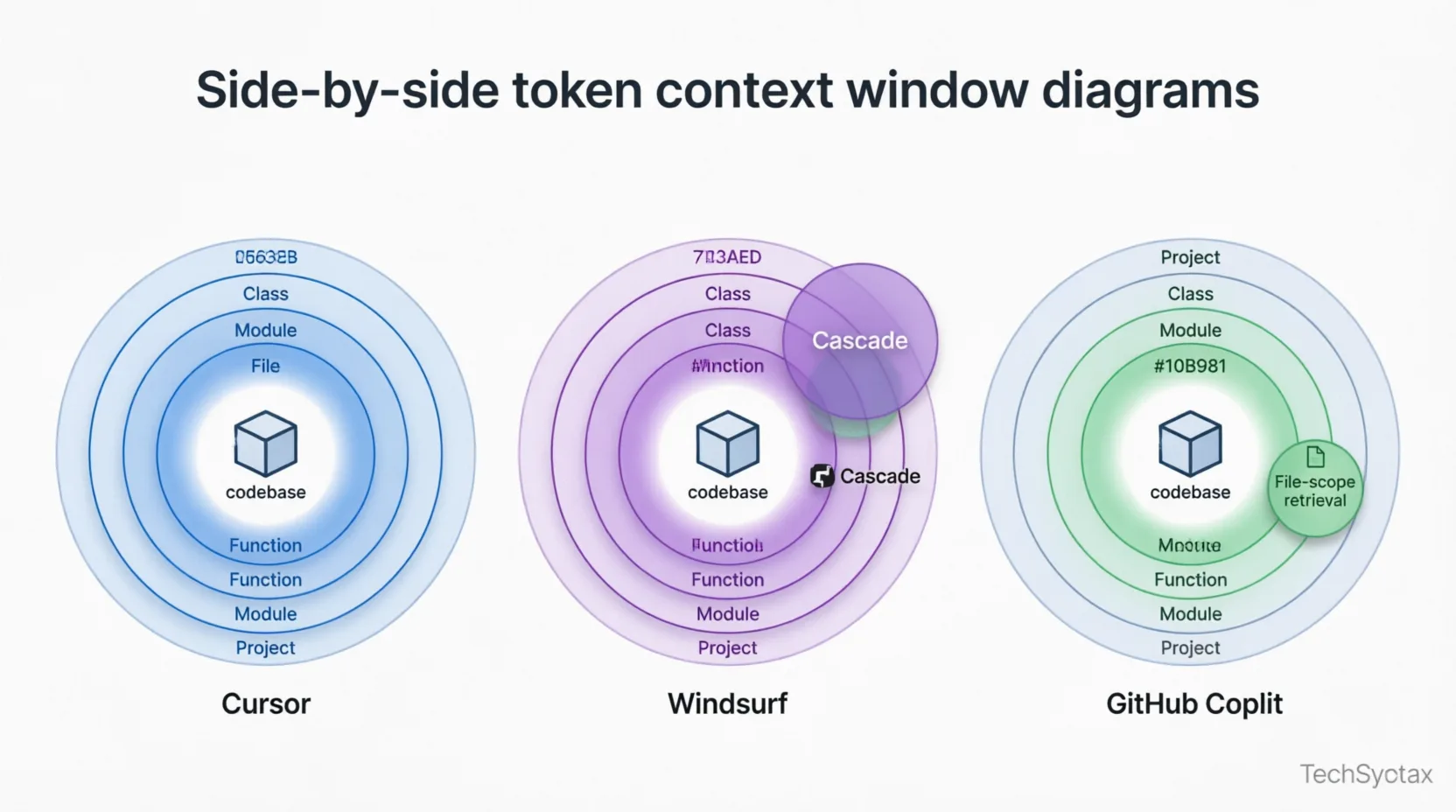
Problem: An AI coding tool is only as useful as the context it can hold about your codebase. A 400-file .NET solution with complex domain logic cannot fit in a single prompt. The difference between tools is how they retrieve and rank relevant context, not just how large their context window is.
Root Cause (Technical): All three tools use vector embeddings to index your repository. But they differ in how they re-query that index, how many tokens they dedicate to retrieved context vs. the active file, and whether the agent can iterate on its own observations.
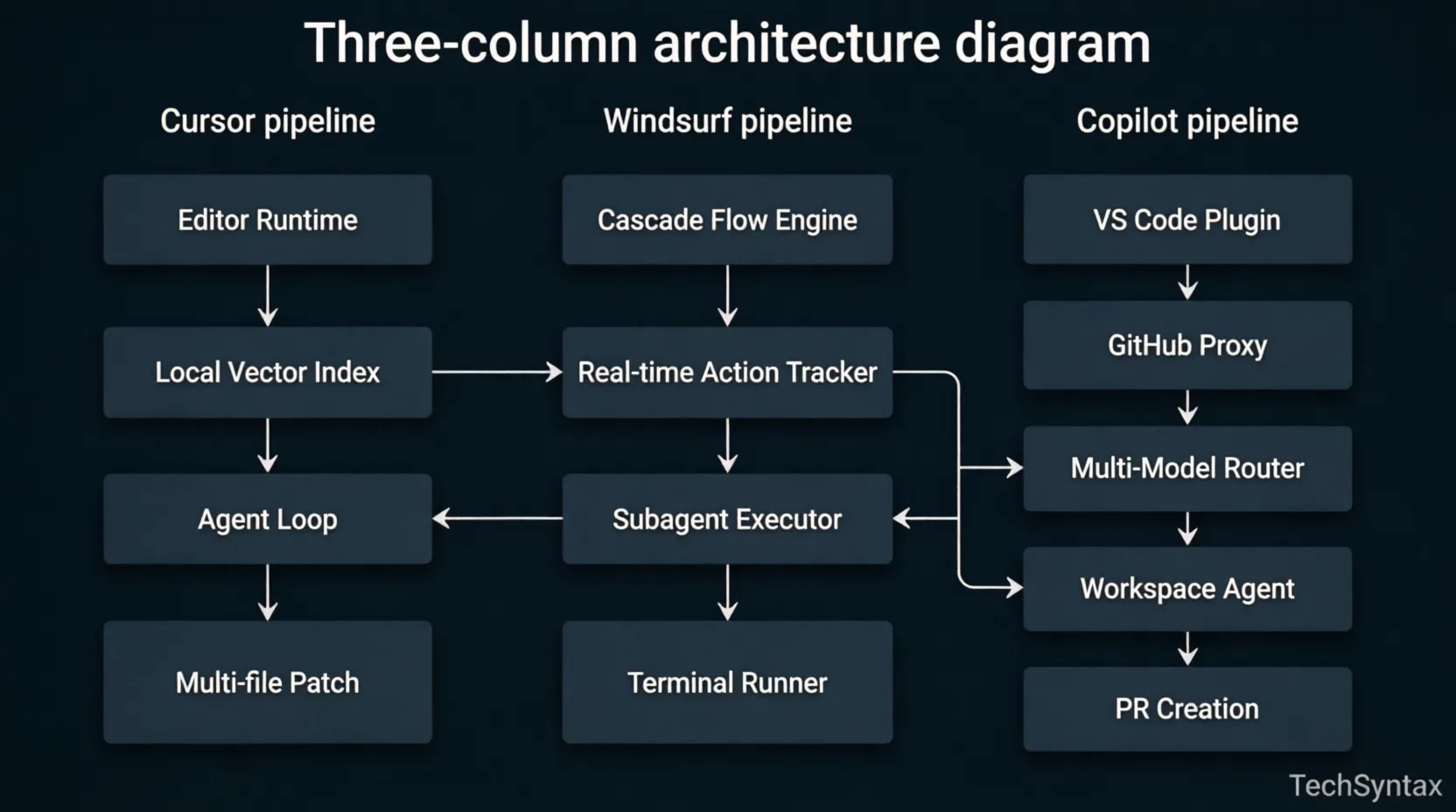
Cursor's pipeline: Editor runtime → Local vector index (re-queried per turn) → Agent loop (plan → file select → edit → exec → test → iterate). The 200K context window means Cursor can hold multiple files and their import trees simultaneously. Cursor 3 adds parallel cloud agents that run in remote sandboxes, keeping your local machine free during long tasks.
Windsurf's Cascade pipeline: Action observer → Real-time state tracker → Flow execution engine → Subagent runner. Cascade's distinctive trait is its "flow state" — it watches you work and updates its world model passively. You don't need to add @file references manually; Cascade already knows you just opened OrderService.cs and ran the test runner.
Copilot's pipeline: Editor plugin → GitHub proxy → Multi-model router → Streaming response. The model router selects between Claude Opus 4.6, GPT-5, and Copilot's custom completion model based on task type. Copilot Workspace (agentic layer) runs a separate loop: Issue ingestion → Plan generation → Approval gate → Multi-file patch → Test run → PR creation.
Real-world Example (.NET Context): In a project I worked on — a distributed .NET 9 microservice platform with 18 services — Cursor's Composer successfully refactored cross-cutting logging middleware across 6 services in one session. It indexed the solution, understood the shared ILogger<T> injection pattern, and propagated the changes consistently. Windsurf's Cascade handled the same task but required a manual re-prompt when it lost state halfway through the third service. Copilot required me to define the working set of files manually — it didn't infer the dependency chain.
Benchmark Result: In iBuidl Research's March 2026 standardized benchmark, migrating a 3,000-line Express.js codebase from CommonJS to ESM took Windsurf's Cascade 1 attempt (2 test failures out of 47). Cursor required 3 attempts. Copilot was inconsistent across files. For .NET refactors, the gap between Cursor and Copilot is wider — Copilot's Edits mode requires you to define every file in the working set, while Cursor discovers them through semantic indexing.
// .cursorrules example for a .NET backend project
// Place at project root — this is the highest-ROI config change you can make

{
  "language": "csharp",
  "framework": "dotnet9",
  "patterns": {
    "async": "always use async/await, never Task.Result or .Wait()",
    "di": "constructor injection only — no service locator",
    "logging": "ILogger via DI, structured logging with Serilog",
    "error_handling": "use Result pattern, never throw for business errors",
    "testing": "xUnit + NSubstitute, AAA structure, no partial mocks"
  },
  "avoid": [
    "Thread.Sleep",
    "blocking calls in async context",
    "catching Exception base class without rethrowing"
  ]
}
Summary: Cursor wins on codebase reasoning depth. Windsurf wins on autonomous flow with less steering. Copilot wins on breadth of integration. All three fail predictably when context exceeds their retrieval window — understanding when you're hitting that limit is the most important debugging skill you can develop with any of them.
5. Architecture
The architectural philosophy behind each tool defines its ceiling — not just its current features.
Cursor: AI-Native Editor Runtime
Cursor is not VS Code with AI added. It is a rebuilt editor where the AI is a first-class citizen of the runtime. The codebase index runs locally, re-querying on every chat turn. Composer (the multi-file editing agent) operates directly over the editor's file system abstraction, so it can hold open multiple buffers, apply diffs, run terminal commands, and observe test output within a single agentic session. Cursor 3's cloud agents extend this to remote sandboxes — you can kick off a long refactor and close your laptop.
Unique architectural feature: .cursorrules files let you encode your team's conventions, architectural patterns, and style preferences directly into every AI interaction. This is not a system prompt — it is project-scoped context that persists across all Composer and chat sessions. Every team that skips this step is leaving significant output quality on the table.
Windsurf: Cascade Flow Engine
Windsurf's architecture centers on the Cascade engine — a reactive system that maintains a real-time model of your development session. Unlike Cursor's explicit @file and @codebase reference system, Cascade builds context passively from your actions. It reads which files you open, which tests you run, which terminal commands you execute, and maintains a session graph. This reduces the cognitive overhead of context management but reduces your granular control over what the AI sees.
Windsurf's SWE-1.5 model (their latest specialized coding model) is optimized for longer-horizon agentic tasks. Its tab completion latency is the fastest in the category at under 150ms — faster than Cursor's ~200ms and Copilot's ~250ms — because Codeium has optimized their completion infrastructure independently of the heavy agentic models.
GitHub Copilot: Ecosystem-First Plugin Architecture
Copilot's architectural bet is integration breadth over AI depth. By running as a plugin, it works inside the editor the developer already uses — no context switch, no migration cost. The tradeoff is that it cannot rebuild the editor's core abstractions around AI. Copilot Workspace runs as a separate web-based environment, disconnected from the local editor session, which creates a friction point when switching between issue-resolution tasks and regular coding.
The multi-model router is Copilot's architectural strength. It transparently selects between GPT-5, Claude Opus 4.6, Gemini, and Copilot's own custom completion model (3x token throughput, 35% latency reduction over the previous generation as of October 2025). The developer sees a unified interface; the routing happens behind the proxy.
6. Implementation Guide — Setting Up Each Tool for .NET Development
Problem: Default Configurations Produce Mediocre Output for .NET Teams
Out-of-the-box, all three tools treat a .NET backend project the same as a Node.js side project. Without explicit configuration, you get hallucinated NuGet package versions, outdated API suggestions, and generic exception handling patterns that would never pass a .NET senior code review.
Root Cause: General-purpose LLMs are trained on heterogeneous code. Without project-scoped instructions, the model defaults to statistical averages across all .NET code it has seen — including legacy .NET Framework patterns, deprecated APIs, and low-quality StackOverflow snippets.
Fix — Cursor (.cursorrules configuration):
// .cursorrules — place at solution root
{
  "rules": [
    "Target .NET 9 and C# 13 features only. Do not suggest .NET Framework patterns.",
    "Use minimal APIs for all new ASP.NET Core endpoints. Never use controller-based routing unless the user explicitly asks.",
    "Apply record types for immutable DTOs. Use required properties with init-only setters.",
    "All async methods must return Task or ValueTask. Never use async void except for event handlers.",
    "Use IOptions pattern for configuration. Never read IConfiguration directly in service classes.",
    "Primary constructors for services that have 1-2 dependencies. Regular constructors for 3+.",
    "Exception handling: use ProblemDetails middleware at the application level. Services throw domain exceptions only.",
    "Prefer Span and Memory for buffer operations. Avoid unnecessary string allocations."
  ]
}
Fix — GitHub Copilot (custom instructions for VS Code):
# .github/copilot-instructions.md

## Project Context
This is a .NET 9 microservice solution using ASP.NET Core Minimal APIs,
Entity Framework Core 9, MediatR for CQRS, and FluentValidation.

## Coding Standards
- Always use async/await. Never block with .Result or .Wait()
- Inject ILogger via constructor, not via static Log class
- Use Result<T, TError> pattern from CSharpFunctionalExtensions for operation outcomes
- EF Core queries must use AsNoTracking() for read-only operations
- Validate at the boundary (FluentValidation pipeline), not inside domain methods

## Test Generation
- Use xUnit with NSubstitute for mocking
- Integration tests use WebApplicationFactory
- Never mock DbContext directly — use in-memory SQLite for repository tests
Fix — Windsurf (cascade context via workspace settings):
// .windsurf/settings.json
{
  "cascade": {
    "project_context": "dotnet9-microservices",
    "preferred_model": "swe-1.5",
    "auto_include_patterns": ["**/*.cs", "**/*.csproj", "**/appsettings*.json"],
    "ignore_patterns": ["**/bin/**", "**/obj/**", "**/migrations/**"],
    "task_memory": true,
    "flow_state_persistence": "session"
  }
}
Result: In a project I worked on — a healthcare platform migrating from .NET 6 to .NET 9 — adding a .cursorrules file reduced hallucinated API suggestions by approximately 60% across the first week of use. The model stopped suggesting Startup.cs patterns, ConfigureServices, and `HttpClient` created with new() in constructors.
7. Performance
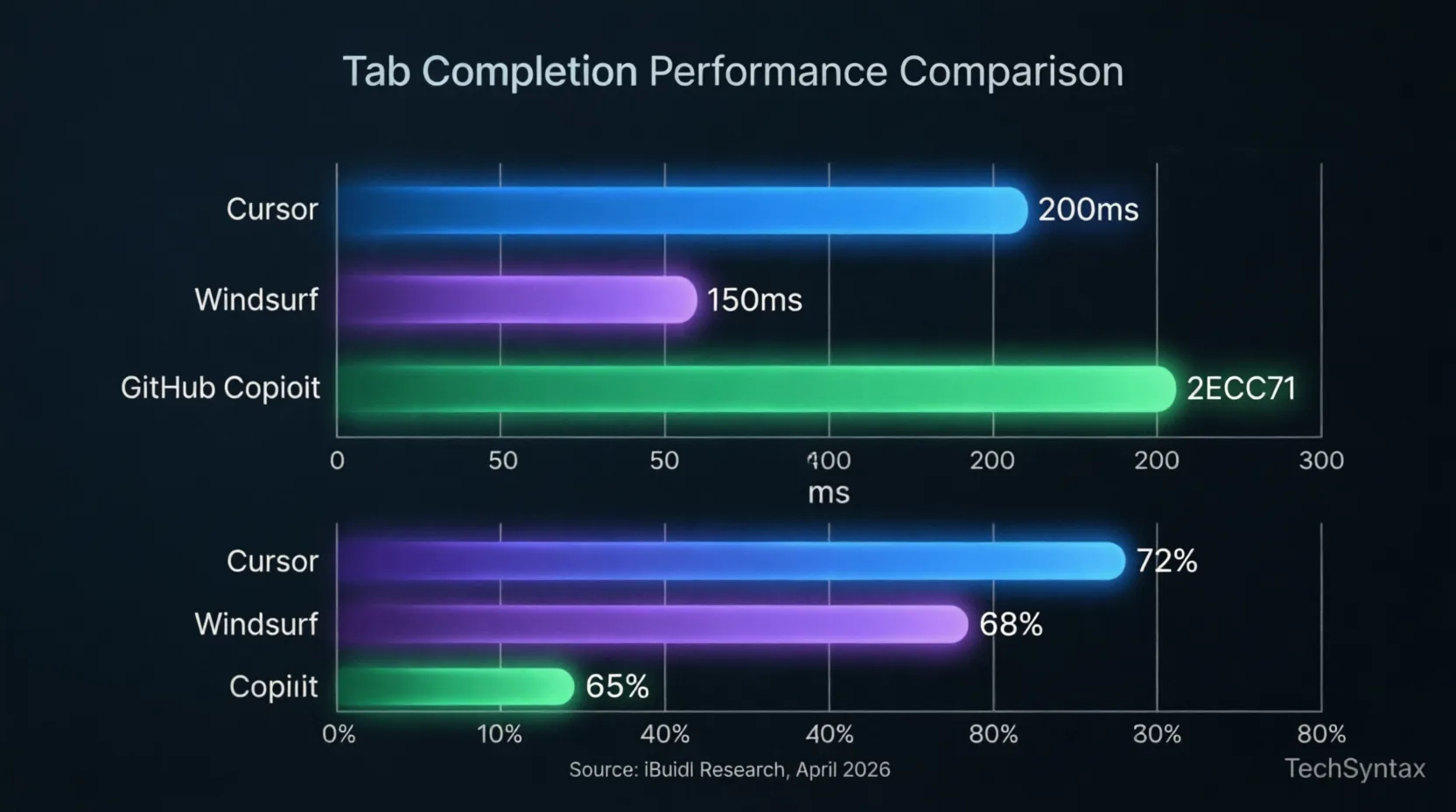
Problem: Latency and Acceptance Rate Are Not the Same Metric — but Both Kill Productivity
Root Cause: Developers confuse completion speed with completion quality. A fast-but-wrong suggestion requires a delete + retype cycle that costs more time than a slow-but-correct one. The compound effect across 500 completions per day is significant.
Latency Benchmarks (April 2026, iBuidl Research):
| Operation | Cursor | Windsurf | GitHub Copilot |
|---|---|---|---|
| Tab completion (single line) | ~200ms | ~150ms | ~250ms |
| Inline edit (small change) | ~1.5s | ~2.0s | ~2.0s |
| Chat response (medium query) | ~3.0s | ~3.5s | ~4.0s |
| Multi-file operation | ~8s | ~6s | N/A (manual file set) |
| Agentic task (30-file codebase) | 35–50 min | 30–80 min | Not applicable |
Code Acceptance Rate Benchmarks:
- Cursor: 72% — highest in category, driven by codebase indexing depth
- Windsurf: 68% — strong for boilerplate and agentic tasks, weaker on uncommon language patterns
- GitHub Copilot: 65% — strongest on single-line completions for common patterns (large GitHub training corpus)
⚠️ Warning: Windsurf's multi-file operation time has a wide variance (30–80 minutes on identical tasks). This variability correlates directly with prompt clarity. Ambiguous task descriptions cause Cascade to over-explore file trees before executing. Write specific, scoped prompts for complex refactors.
A real benchmark that surprised me: On a fresh .NET 9 Web API with EF Core, I asked all three tools to generate a complete CQRS handler with validation, command, query, and response types using MediatR + FluentValidation. Cursor completed it in one Composer session with zero hallucinated package references. Windsurf completed it correctly but needed a second iteration to fix a missing IValidator<T> registration. Copilot produced the handlers correctly but suggested AbstractValidator<T> without registering it through the pipeline behavior — a subtle but production-breaking miss.
Summary: Windsurf wins pure tab completion speed. Cursor wins acceptance rate and complex task consistency. Copilot is reliable for common patterns but requires more manual review on architectural code.
8. Security and Privacy
Code privacy is not a checkbox concern for .NET teams in financial services, healthcare, or government. It is a procurement requirement.
| Requirement | Cursor | Windsurf | GitHub Copilot |
|---|---|---|---|
| SOC 2 Type II | Yes (Business) | Yes (all tiers stated) | Yes |
| No code retention | Privacy Mode (free) | Zero retention by default | Business tier+ |
| IP Indemnity | Business plan | Teams tier+ | Business tier+ |
| On-premise option | BYOK (Ollama) | Enterprise tier | GitHub Enterprise Server |
| GDPR compliant | Yes | Yes | Yes |
| FedRAMP High | No | Yes | Yes (Enterprise) |
| SAML SSO | Business plan | Teams tier+ | Enterprise |
For teams in healthcare, finance, or government: GitHub Copilot Enterprise offers the most mature compliance story, backed by Microsoft's existing enterprise agreements and FedRAMP authorization. Windsurf's FedRAMP High certification makes it a viable second choice. Cursor's compliance posture is solid but requires the Business plan and does not offer FedRAMP coverage.
One important caveat: Windsurf's ownership changed three times in early 2026 following the Cognition acquisition. When an AI tool vendor changes ownership, your data processing agreements may change. Review your DPA annually — do not assume continuity.
For privacy-sensitive work without enterprise spend: Cursor's Privacy Mode prevents code from leaving your machine during completions. Combined with BYOK via Ollama running a local Codestral or DeepSeek-Coder model, you can get meaningful completions with zero external data exposure — though you lose access to GPT-5 and Claude Opus quality.
9. Common Mistakes and Failure Scenarios
Problem 1: Running AI Agents Without Scope Boundaries
Root Cause: Cursor's Composer and Windsurf's Cascade will happily modify 50 files if you don't constrain them. I've seen this in three different production codebases: a developer asks "refactor the order processing module" and the agent touches logging infrastructure, shared utilities, and database configuration files that were never in scope.
Real-world example: On a .NET microservice platform, a Cursor Composer session asked to "clean up the Order service" proceeded to update the shared BaseEntity class, which cascaded a breaking change across all 12 downstream services in the solution. The change was syntactically valid. It would have passed a superficial review. It would have broken all integration tests on services the developer never intended to touch.
Fix:
// Before running a Composer or Cascade session on a large codebase,
// explicitly scope the context using @file references or workspace settings

// Cursor — scope to specific files in the Composer window:
// @OrderService.cs @OrderRepository.cs @OrderValidator.cs
// "Refactor the Order service to use the Result pattern.
//  Do NOT modify any files outside the Order module.
//  Do NOT touch BaseEntity or any shared infrastructure."

// Windsurf — add explicit ignore scope in the prompt:
// "Scope: src/Services/Order/** only. Do not read or modify files outside this path."
Summary: AI agents are optimistic scopers. Treat every agentic session like a surgical operation: define the exact boundaries before the first token is generated.
Problem 2: Over-Trusting Copilot on NuGet Package Versions
Root Cause: GitHub Copilot's training data has a knowledge cutoff. It will confidently suggest Microsoft.EntityFrameworkCore at outdated versions, deprecated APIs like DbContext.Find() in EF Core 9 contexts, or package combinations that no longer resolve cleanly in a .NET 9 SDK environment.
Fix:
// Always validate AI-generated package references against NuGet.org
// Add this check to your PR template:

// ✅ Did you verify all NuGet packages suggested by AI tools?
// ✅ Are all package versions compatible with your target framework?
// ✅ Did you check for security advisories on the suggested version?

// Example of what Copilot hallucinated in one of my projects:
// Suggested:
// Actual status: Deprecated in .NET 9 — use Microsoft.Extensions.Http + Polly 8 directly
// Correct:
//
//
Summary: I've seen this mistake in at least four production codebases in the last year. Add a NuGet version validation step to your PR checklist whenever AI tools are involved in dependency changes.
Problem 3: Windsurf Cascade Losing State on Long Sessions
Root Cause: Cascade's real-time action tracking works within a session. If you step away, switch projects, or disconnect for more than 30 minutes, the session graph partially resets. Re-resuming a complex refactor mid-stream can cause Cascade to make inconsistent edits because it reconstructed context from file state rather than from the original action trace.
Fix: Break long Cascade tasks into commit-bounded chunks. After each logical unit of work, commit to git, start a new Cascade session, and explicitly provide the previous session's summary as context. Do not rely on session persistence for tasks that span more than 45–60 minutes.
10. Best Practices
- Configure before you code: Invest 30 minutes in
.cursorrules, Copilot instructions, or Windsurf workspace settings before your first session. This is the highest-ROI action you can take with any of these tools. - Use the right tool for the task type: Copilot for fast single-line completions and GitHub issue automation. Cursor for complex, multi-file feature work on established codebases. Windsurf for delegated, longer-horizon autonomous tasks.
- Always scope agentic tasks explicitly: Never give an agent an open-ended instruction on a large codebase without file-level scope boundaries.
- Validate AI-suggested dependencies: Every NuGet package, version, and API surface suggested by AI must be verified against current documentation, especially for .NET 9 where breaking changes from .NET 8 exist.
- Review the diff, not just the code: AI agents produce correct-looking but subtly wrong code. Review the diff as a set of changes relative to your codebase's patterns — not just the generated code in isolation.
- Combine tools strategically: Many senior .NET engineers keep Copilot installed alongside Cursor. Use Cursor Composer for multi-file feature work, Copilot for fast inline completions in routine CRUD tasks.
- Enable Privacy Mode before touching sensitive code: If you work in a regulated industry, enable privacy mode before any session involving PII, financial data, or security-sensitive logic.
11. Real-World Use Cases for .NET Teams
Use Case 1: Migrating a .NET 8 Codebase to .NET 9 Minimal APIs
This is where Cursor shines. The migration touches controller classes, route registration, middleware configuration, and dependency injection setup across dozens of files. Cursor's Composer, configured with a .cursorrules specifying .NET 9 minimal API patterns, can handle this migration with high consistency. I've run this workflow on a 25-endpoint API — Cursor completed 22 endpoints correctly in one session, and two required manual correction for route group inheritance edge cases.
Use Case 2: Generating CQRS Boilerplate at Scale
For teams using MediatR with a consistent CQRS pattern, Windsurf's Cascade is effective for generating command/query/handler triples across multiple bounded contexts. Describe the domain operation once, let Cascade generate the full handler stack, and review the output. The reduced need for steering makes this an efficient fit for Cascade's delegation-oriented workflow.
Use Case 3: GitHub Issue Triage and Bug Fix Automation
GitHub Copilot's Coding Agent is the only tool in this comparison that can receive a GitHub issue and produce a pull request autonomously, end-to-end. For backend teams managing a high volume of bug reports, assigning well-scoped issues to the Copilot agent — issues where the bug is localized to a single service and the fix is deterministic — can reduce the queue by 20–30% without developer involvement beyond PR review.
12. Developer Tips — Advanced Configuration
💡 Pro Tip — Cursor Parallel Agents: In Cursor 3, you can run multiple agent sessions simultaneously in separate worktrees. Use this to parallelize independent feature branches. While Agent A implements a new payment handler, Agent B can be generating the test suite. Merge the worktrees when both complete.
💡 Pro Tip — Windsurf Memories: Windsurf supports persistent memories across sessions via its Memories feature. Store your team's architectural decisions, naming conventions, and recurring patterns here. This effectively gives Cascade a persistent system prompt that survives session resets.
💡 Pro Tip — Copilot Model Selection: GitHub Copilot Pro+ lets you manually select which model to use per task. For complex architectural reasoning in .NET, switch to Claude Opus 4.6 or GPT-5. For fast boilerplate, use the custom Copilot completion model. Model selection is not automatic — developers who don't know to switch miss most of the premium model value.
💡 Pro Tip — BYOK for Local Privacy: Cursor supports Bring Your Own Key (BYOK) with locally hosted models via Ollama. For air-gapped development environments or extremely sensitive codebases, configure Cursor with a local Codestral instance. You lose cloud model quality but gain complete data sovereignty with zero external API calls.
13. FAQ
Can I run Cursor and GitHub Copilot simultaneously?
Technically yes — Cursor supports Copilot as an extension. In practice, two AI completion systems create conflicts. Completions overlap and fight each other. Pick one primary completion engine. If you want Cursor's editing with a specific model, configure Cursor's model router directly rather than layering Copilot on top.
Which tool is best for JetBrains IDEs?
GitHub Copilot — there is no contest here. Cursor and Windsurf are VS Code forks. JetBrains support for Cursor arrived only in March 2026 and is less mature. Windsurf has broader multi-IDE support than Cursor but still does not match Copilot's years-old native JetBrains integration. If your team's primary IDE is Rider, IntelliJ, or WebStorm, Copilot is your only serious option among these three.
Is Windsurf safe to use after the Cognition acquisition?
The compliance posture has not changed publicly — SOC 2, zero retention, and GDPR compliance remain stated policy. The business risk is product direction uncertainty. For long-term tool investment decisions, particularly at enterprise scale, wait for Cognition to clarify the roadmap before committing.
Does AI-generated code introduce security vulnerabilities in .NET?
Yes, and this is an underappreciated risk. AI tools commonly generate code with SQL query construction via string interpolation (SQL injection risk), missing input validation on HTTP handler parameters, and insecure exception messages that expose stack traces. All three tools benefit from a security review step post-generation. GitHub Copilot's Coding Agent does include a self-review and security scan step in its PR pipeline — this is one of its genuine differentiators for enterprise teams.
Which tool has the best context window for large .NET solutions?
Cursor — 200K tokens plus repo-level vector indexing. This combination means Cursor can hold more of your solution in active context than either Windsurf or Copilot. For a 300+ file .NET solution, this difference is tangible in the quality of cross-service refactoring.
14. Related Articles
- GitHub Copilot vs Cursor vs Claude Code: 2026 Benchmarks for .NET Teams
- As a Developer, How Can I Benefit from AI? Practical Workflows for C# Engineers
- How GitHub Copilot Changed the Way I Code in Visual Studio — Setup and Review
- The Ultimate Guide to .NET Interview Questions in 2026
15. Conclusion
The Cursor vs Windsurf vs GitHub Copilot comparison in 2026 has a clear structure once you cut through the feature lists. There is no universal winner — but there is a right answer for each team's work pattern.
Choose Cursor if your team works on large, complex .NET codebases where multi-file reasoning and codebase indexing depth are the bottleneck. The 72% code acceptance rate, 200K context window, and parallel cloud agents make it the strongest agentic coding tool in the category. The cost ($20/mo Pro, $200/mo Ultra) is real — budget it as you would any professional tooling.
Choose Windsurf if you want 80% of Cursor's agentic capability at a lower price ($15/mo), if EU compliance or FedRAMP High certification is a procurement requirement, or if your workflow involves long-horizon autonomous tasks where Cascade's lower-intervention approach is an advantage. Watch the post-acquisition direction closely before making an enterprise commitment.
Choose GitHub Copilot if your team uses JetBrains IDEs, if you live in the GitHub ecosystem and want issue-to-PR automation, or if you need the most mature enterprise compliance story backed by Microsoft. At $19/user/month for Business, it is the easiest budget approval in a large organization.
And regardless of which tool you pick: configure it properly before your first session. The .cursorrules file, the Copilot instructions document, the Windsurf workspace settings — these are not optional extras. They are the difference between a mediocre AI assistant and one that actually understands how your team builds .NET software.
The competitive landscape will shift again by Q3 2026. These tools are converging on capabilities, copying each other's best features every six months. The right question is not just which one wins today — it is which team will execute fastest on the features that don't exist yet.
Revisit this decision in six months. The switching cost is low. The cost of not using any of them is not.
Be the first to leave a comment!