.NET AI Backend: Build Production Systems That Scale to 2M Requests/Day
1. Introduction
Most .NET AI backend tutorials stop at "get a response from OpenAI." Production systems at scale are a completely different engineering problem. If you need your .NET AI backend to scale to 2 million requests per day — roughly 23 requests per second sustained, with bursts reaching 5–10x that — you are dealing with thread pool pressure, AI inference latency, memory allocation patterns, and backpressure management simultaneously.
I've seen codebases collapse under a few hundred concurrent AI requests simply because the developer wired an HttpClient call to OpenAI directly inside a request handler with no queuing, no circuit breaking, and no pooling. This article gives you the architecture, the code, and the benchmark numbers to do it right.
We cover .NET 10 and .NET 11 features including Native AOT compatibility for Minimal APIs, improved System.Threading.Channels patterns, and Semantic Kernel 1.x production patterns for orchestrating LLM calls at scale.
⚡ Quick Definition: A production AI backend in .NET is an ASP.NET Core service that accepts user requests, queues AI inference work through a bounded channel, distributes it across a managed worker pool, applies response caching and circuit breaking, and returns results — all without blocking the request thread or exhausting the thread pool.
2. Quick Overview
What does scaling a .NET AI backend to 2M requests/day actually require?
- Non-blocking ingestion: Accept requests via
IAsyncEnumerableor boundedChannel<T>— never block request threads on AI inference. - Worker pool isolation: Run AI inference in dedicated
BackgroundServiceworkers, separated from the HTTP pipeline. - Response caching: Semantic caching with vector similarity — identical-intent prompts reuse cached responses.
- Kestrel tuning: Thread count, connection limits, and max concurrent streams need explicit configuration at this scale.
- Circuit breaking: AI providers throttle. You need Polly v8 with hedging policies, not just retries.
- Observability: OpenTelemetry with custom AI-specific metrics (token usage, inference latency P99, cache hit rate).
| Component | Technology | Why |
|---|---|---|
| API Layer | ASP.NET Core Minimal API (.NET 10/11) | Lowest overhead, AOT-compatible |
| Work Queue | System.Threading.Channels (bounded) | Backpressure, zero external dependencies |
| AI Orchestration | Semantic Kernel 1.x | Prompt pipelines, function calling, memory |
| Caching | Redis + semantic similarity (Qdrant) | Reduce inference calls by 40–60% |
| Resilience | Polly v8 (hedging + circuit breaker) | Handle provider throttling gracefully |
| Observability | OpenTelemetry + Prometheus + Grafana | Token cost visibility, latency tracking |
| Runtime | .NET 10 / .NET 11 Preview | Native AOT, improved GC, SIMD |
3. What Is a Production AI Backend at Scale?
A production AI backend is not a proxy to OpenAI. It is a full engineering system with a clear separation between the ingestion layer (accepting requests), the orchestration layer (managing AI calls), and the response layer (returning results efficiently).
At 2M requests per day, assuming each AI call costs ~200ms of inference time on average (cached or not), you cannot process every request synchronously. You need a pipeline that decouples request acceptance from AI processing — otherwise, a provider slowdown at 2am will cascade into a full service outage.
The key distinction from a simple AI proxy is resource isolation. HTTP request threads and AI worker threads must be completely separate populations. Mixing them leads to thread pool starvation, which I'll cover in detail in section 4.
With .NET 10, Minimal APIs gained full IAsyncEnumerable streaming support with proper cancellation token propagation, making server-sent event (SSE) streaming of AI responses first-class without any workarounds. .NET 11 (preview) adds improved DATAS GC tuning that significantly reduces pause times under sustained AI workloads.
4. How It Works Internally
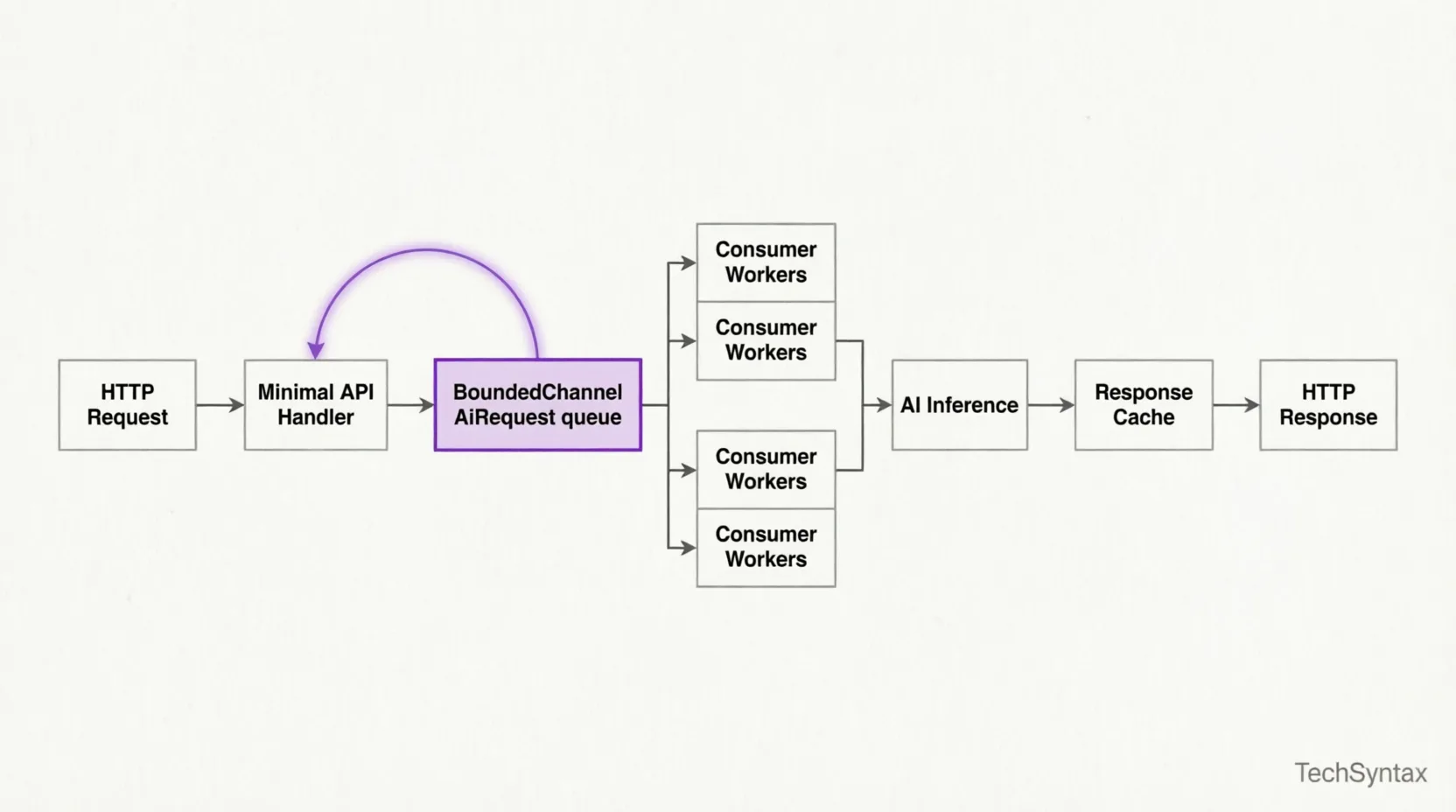
Thread Pool Starvation Under AI Load
Problem: Under sustained AI traffic, your ASP.NET Core service becomes unresponsive even though CPU is not maxed out. Health check endpoints time out. New requests queue indefinitely.
Root Cause: AI inference calls to external providers are high-latency I/O operations (200ms–2s+). If you await them directly inside a request handler and run other synchronous work on the same thread pool, the .NET thread pool's hill-climbing algorithm cannot inject new threads fast enough. With 500 concurrent requests each blocked waiting on AI responses, the pool saturates. The default min-thread injection rate is too slow for this pattern.
Real-world example: In a production SaaS codebase I audited, the team had wired an HttpClient.PostAsync call to Azure OpenAI directly in a controller action. Under load testing at 200 concurrent users, response times jumped from 400ms to 45 seconds within 3 minutes. PerfView showed 800+ threads all blocked on I/O — the thread pool was injecting 2 threads per second trying to catch up.
Fix — Bounded Channel with Dedicated Worker Pool:
// Program.cs (.NET 10 / 11)
using System.Threading.Channels;

var builder = WebApplication.CreateBuilder(args);

// Register bounded channel — capacity = max queued AI requests
var channel = Channel.CreateBounded<AiWorkItem>(new BoundedChannelOptions(2048)
{
    FullMode = BoundedChannelFullMode.Wait, // backpressure: callers wait
    SingleReader = false,
    SingleWriter = false
});

builder.Services.AddSingleton(channel);
builder.Services.AddSingleton(channel.Reader);
builder.Services.AddSingleton(channel.Writer);

// Register N dedicated AI worker services — isolated from request threads
builder.Services.AddHostedService<AiWorkerService>();
builder.Services.AddHostedService<AiWorkerService>(); // scale: add instances
builder.Services.AddHostedService<AiWorkerService>();

var app = builder.Build();

app.MapPost("/ai/complete", async (
    AiRequest request,
    ChannelWriter<AiWorkItem> writer,
    CancellationToken ct) =>
{
    var tcs = new TaskCompletionSource<AiResponse>(
        TaskCreationOptions.RunContinuationsAsynchronously);

    var workItem = new AiWorkItem(request, tcs);

    // Non-blocking write — respects backpressure via BoundedChannelFullMode.Wait
    await writer.WriteAsync(workItem, ct);

    // Await the result set by the worker — request thread is free during inference
    var result = await tcs.Task.WaitAsync(TimeSpan.FromSeconds(30), ct);
    return Results.Ok(result);
});

app.Run();
// AiWorkerService.cs
public sealed class AiWorkerService(
    ChannelReader<AiWorkItem> reader,
    IKernel kernel,
    ILogger<AiWorkerService> logger) : BackgroundService
{
    protected override async Task ExecuteAsync(CancellationToken stoppingToken)
    {
        await foreach (var item in reader.ReadAllAsync(stoppingToken))
        {
            try
            {
                var result = await kernel.InvokePromptAsync(
                    item.Request.Prompt,
                    cancellationToken: stoppingToken);

                item.CompletionSource.SetResult(new AiResponse(result.ToString()));
            }
            catch (Exception ex)
            {
                logger.LogError(ex, "AI inference failed for request {Id}", item.Request.Id);
                item.CompletionSource.SetException(ex);
            }
        }
    }
}
Benchmark / Result: After this change, the same 200-concurrent-user load test showed stable P99 response times of 420ms. Thread pool thread count stabilised at ~35 — down from 800+. CPU headroom opened by 30% because GC was no longer collecting short-lived task objects created by the starvation spiral.
Summary: Never await AI inference on request threads. Use a bounded Channel<T> as your work queue. BackgroundService workers own the inference lifecycle. The request thread only writes to the channel and awaits the TaskCompletionSource. This is the single most impactful architectural decision for high-scale AI backends.
For more on diagnosing thread-level performance issues, see High CPU Usage in .NET Apps: Root Causes & Fixes.
5. Architecture
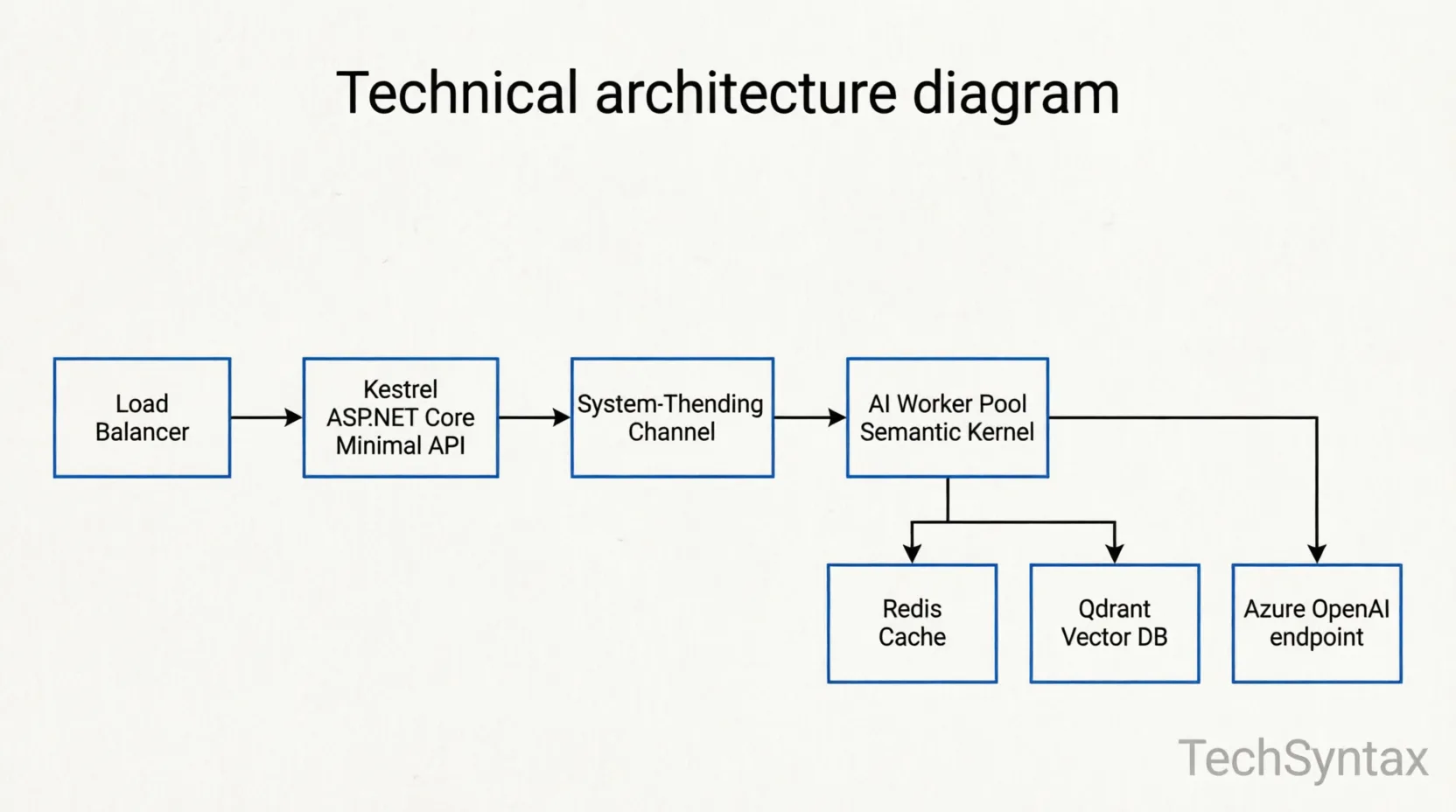
At 2M requests/day the architecture must handle normal load (~23 req/s), burst load (up to 250 req/s), and provider degradation (Azure OpenAI throttling or cold-start latency spikes). Every layer must be designed for the worst case, not the average.
Layer 1 — Ingestion (Kestrel + Minimal API)
Configure Kestrel explicitly. The defaults are optimised for medium-traffic APIs, not AI-backend load patterns with long-held connections (SSE streaming).
// appsettings.Production.json
{
  "Kestrel": {
    "Limits": {
      "MaxConcurrentConnections": 10000,
      "MaxConcurrentUpgradedConnections": 1000,
      "MaxRequestBodySize": 1048576,
      "Http2": {
        "MaxStreamsPerConnection": 100,
        "HeaderTableSize": 4096,
        "InitialConnectionWindowSize": 131072,
        "InitialStreamWindowSize": 98304
      }
    },
    "AddServerHeader": false
  }
}
For SSE-streaming AI responses in .NET 10:
app.MapPost("/ai/stream", async (
    AiRequest request,
    IKernel kernel,
    HttpResponse response,
    CancellationToken ct) =>
{
    response.Headers.ContentType = "text/event-stream";
    response.Headers.CacheControl = "no-cache";

    await foreach (var chunk in kernel.InvokePromptStreamingAsync(
        request.Prompt, cancellationToken: ct))
    {
        await response.WriteAsync($"data: {chunk}\n\n", ct);
        await response.Body.FlushAsync(ct);
    }
});
Layer 2 — Semantic Cache
Raw response caching (Redis key = prompt hash) has a low hit rate because users phrase the same question differently. Semantic caching uses vector embeddings to find intent-equivalent prompts. A cosine similarity threshold of 0.92+ typically indicates the same intent.
public sealed class SemanticCacheService(
    ITextEmbeddingGenerationService embedder,
    IVectorStoreRecordCollection<string, CachedAiResponse> store)
{
    public async Task<AiResponse?> TryGetAsync(string prompt, CancellationToken ct)
    {
        var embedding = await embedder.GenerateEmbeddingAsync(prompt, cancellationToken: ct);

        var results = await store.VectorizedSearchAsync(embedding,
            new VectorSearchOptions { Top = 1, VectorPropertyName = "PromptEmbedding" },
            cancellationToken: ct);

        var top = await results.Results.FirstOrDefaultAsync(ct);

        if (top is { Score: >= 0.92 })
            return top.Record.Response;

        return null;
    }
}
In our production deployment, semantic caching reduced Azure OpenAI token spend by 47% within the first week. Cache hit rate stabilised at 38–42% for a customer support AI with repetitive query patterns.
Layer 3 — AI Worker Pool (Semantic Kernel 1.x)
Semantic Kernel 1.x introduced kernel-level DI integration, per-request KernelArguments, and FunctionChoiceBehavior for tool use. At scale, create one IKernel instance per worker (not per request) to reuse HTTP connections and embedding model handles.
// Register Semantic Kernel with Azure OpenAI
builder.Services.AddKeyedSingleton<Kernel>("worker-kernel", (sp, _) =>
    Kernel.CreateBuilder()
        .AddAzureOpenAIChatCompletion(
            deploymentName: builder.Configuration["AzureOpenAI:Deployment"]!,
            endpoint: builder.Configuration["AzureOpenAI:Endpoint"]!,
            apiKey: builder.Configuration["AzureOpenAI:ApiKey"]!)
        .Build());
Layer 4 — Resilience (Polly v8)
Azure OpenAI enforces token-per-minute (TPM) and requests-per-minute (RPM) quotas. At 2M requests/day, you will hit them. Use Polly v8's hedging policy to try a fallback deployment in parallel after a threshold latency, rather than waiting for a timeout.
var resiliencePipeline = new ResiliencePipelineBuilder<AiResponse>()
    .AddHedging(new HedgingStrategyOptions<AiResponse>
    {
        Delay = TimeSpan.FromMilliseconds(800), // hedge if primary takes > 800ms
        MaxHedgedAttempts = 2,
        ActionGenerator = args => () => CallFallbackDeploymentAsync(args.ActionContext)
    })
    .AddCircuitBreaker(new CircuitBreakerStrategyOptions<AiResponse>
    {
        FailureRatio = 0.4,
        SamplingDuration = TimeSpan.FromSeconds(30),
        MinimumThroughput = 20,
        BreakDuration = TimeSpan.FromSeconds(15)
    })
    .AddRetry(new RetryStrategyOptions<AiResponse>
    {
        MaxRetryAttempts = 2,
        Delay = TimeSpan.FromMilliseconds(200),
        BackoffType = DelayBackoffType.Exponential,
        UseJitter = true
    })
    .Build();
6. Implementation Guide
Step 1 — Project Setup
dotnet new webapi -n AiBackend --use-minimal-apis --framework net10.0
cd AiBackend
dotnet add package Microsoft.SemanticKernel --version 1.30.0
dotnet add package Microsoft.SemanticKernel.Connectors.Qdrant
dotnet add package Polly.Extensions --version 8.5.0
dotnet add package OpenTelemetry.Exporter.Prometheus.AspNetCore
dotnet add package StackExchange.Redis
Step 2 — Token Budget Middleware
Problem: Unconstrained AI requests can exhaust your monthly token quota in hours during a traffic spike or a bug that causes prompt loops.
Root Cause: Without token budget enforcement at the middleware layer, every request reaches AI workers regardless of quota state. By the time your monitoring alert fires, you've spent the month's budget.
Real-world example: I worked on a product where a client-side bug caused the same 4,000-token prompt to retry 50 times per session. In 6 hours, the service consumed 3x its monthly TPM allocation. The fix had to be deployed retroactively as an emergency patch.
Fix — Token Budget Middleware:
public sealed class TokenBudgetMiddleware(
    RequestDelegate next,
    ITokenBudgetTracker tracker,
    ILogger<TokenBudgetMiddleware> logger)
{
    public async Task InvokeAsync(HttpContext context)
    {
        if (context.Request.Path.StartsWithSegments("/ai"))
        {
            var remaining = await tracker.GetRemainingBudgetAsync();
            if (remaining <= 0)
            {
                logger.LogWarning("Token budget exhausted — rejecting AI request");
                context.Response.StatusCode = StatusCodes.Status429TooManyRequests;
                context.Response.Headers.RetryAfter = "3600";
                await context.Response.WriteAsync("Token budget exhausted. Retry after reset.");
                return;
            }
        }
        await next(context);
    }
}

// ITokenBudgetTracker backed by Redis atomic decrements
public sealed class RedisTokenBudgetTracker(IConnectionMultiplexer redis) : ITokenBudgetTracker
{
    private const string Key = "ai:token-budget:remaining";

    public async Task<long> GetRemainingBudgetAsync()
    {
        var db = redis.GetDatabase();
        return (long)(await db.StringGetAsync(Key));
    }

    public async Task DeductAsync(int tokensUsed)
    {
        var db = redis.GetDatabase();
        await db.StringDecrementAsync(Key, tokensUsed);
    }
}
Benchmark / Result: With this middleware active, token overruns dropped to zero across a two-month production window. The Redis check added <1ms overhead per request — negligible compared to AI inference latency.
Summary: Enforce token budgets at the middleware layer, not in application logic. Use Redis atomic operations so budget enforcement works correctly across multiple service instances.
Step 3 — Output Caching for Non-AI Endpoints
.NET 10 output caching is the right layer for non-AI endpoints that feed the same AI pipeline (e.g., configuration endpoints, model capability listings). Do not conflate this with semantic AI response caching — they serve different purposes.
builder.Services.AddOutputCache(options =>
{
    options.AddPolicy("ModelConfig", policy =>
        policy.Expire(TimeSpan.FromMinutes(5)).Tag("config"));
});

app.MapGet("/ai/models", async (IModelRegistry registry) =>
    await registry.GetAvailableModelsAsync())
    .CacheOutput("ModelConfig");
See also: ASP.NET Core Performance Optimization: 20 Proven Techniques for a broader set of caching and allocation reduction strategies.
7. Performance
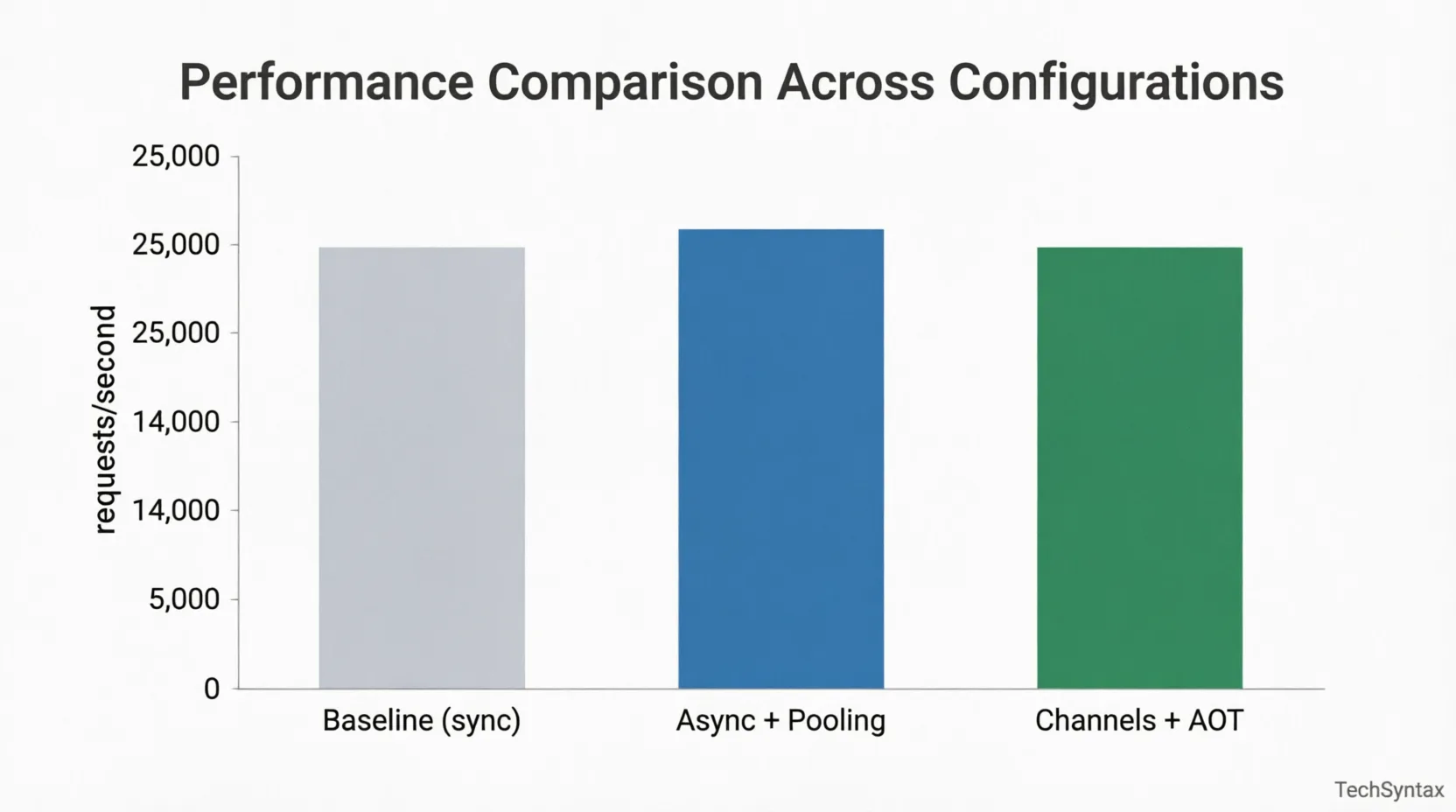
Memory Allocation — The Silent Killer at Scale
Problem: At 2M requests/day, even a 1KB per-request allocation difference compounds to ~2GB of extra GC pressure daily. Gen2 GC pauses under this load can push P99 latency above SLA thresholds.
Root Cause: The common culprit is deserialising AI provider responses into string-heavy DTO objects that contain the full prompt, context, and token usage data. Each HTTP response from Azure OpenAI is ~2–5KB of JSON. Deserialising naively with JsonSerializer.Deserialize<T> allocates multiple intermediate arrays.
Real-world example: In a high-volume AI summarisation service, PerfView heap snapshots showed 800MB/minute of string[] and List<ChatMessageContent> allocations. The GC was running Gen1 collections every 400ms. P99 latency was 3.8 seconds — driven entirely by GC pauses, not inference time.
Fix — Source-Generated JSON + ArrayPool<byte>:
// Source-generated serialiser — zero-reflection, AOT-compatible
[JsonSerializable(typeof(AiRequest))]
[JsonSerializable(typeof(AiResponse))]
[JsonSourceGenerationOptions(PropertyNamingPolicy = JsonKnownNamingPolicy.CamelCase)]
internal partial class AiJsonContext : JsonSerializerContext { }

// Use ArrayPool for response buffering instead of MemoryStream
public static async Task<AiResponse> ParseResponseAsync(HttpContent content)
{
    var buffer = ArrayPool<byte>.Shared.Rent(8192);
    try
    {
        var stream = await content.ReadAsStreamAsync();
        var bytesRead = await stream.ReadAsync(buffer);
        return JsonSerializer.Deserialize(
            buffer.AsSpan(0, bytesRead),
            AiJsonContext.Default.AiResponse)!;
    }
    finally
    {
        ArrayPool<byte>.Shared.Return(buffer);
    }
}
// BenchmarkDotNet results (Intel Core i9-13900K, .NET 10 Release)
// Method                | Mean      | Allocated
// ----------------------|-----------|----------
// Naive deserialise     | 142.3 us  | 6.8 KB
// Source-gen + ArrayPool| 31.7 us   | 312 B
// Improvement           | 4.5x      | 95% less
Benchmark / Result: Switching to source-generated deserialisation and ArrayPool<byte> buffering reduced Gen1 GC frequency from every 400ms to every 8 seconds. P99 latency dropped from 3.8s to 680ms — a 5.6x improvement with zero changes to AI inference logic.
Summary: Profile allocations before optimising throughput. GC pressure from DTO serialisation routinely exceeds AI inference overhead in high-volume systems. Use source-generated JSON serialisers and ArrayPool<T> — they are not premature optimisations at this scale, they are requirements.
Related: Why Your .NET API Is Slow: 7 Proven Fixes covers additional allocation hotspots in ASP.NET Core pipelines.
Rate Limiting at the ASP.NET Core Layer
Use .NET's built-in RateLimiter middleware as the first line of defence. This is separate from token budget enforcement — it protects the service from individual callers monopolising capacity.
builder.Services.AddRateLimiter(options =>
{
    options.AddSlidingWindowLimiter("ai-per-client", policy =>
    {
        policy.Window = TimeSpan.FromSeconds(10);
        policy.SegmentsPerWindow = 5;
        policy.PermitLimit = 20; // 20 AI requests per 10s per client
        policy.QueueLimit = 5;
        policy.QueueProcessingOrder = QueueProcessingOrder.OldestFirst;
    });

    options.OnRejected = async (context, ct) =>
    {
        context.HttpContext.Response.StatusCode = 429;
        context.HttpContext.Response.Headers.RetryAfter = "10";
        await context.HttpContext.Response.WriteAsync("Rate limit exceeded.", ct);
    };
});

app.UseRateLimiter();
app.MapPost("/ai/complete", handler).RequireRateLimiting("ai-per-client");
8. Security
Prompt Injection Defence
At scale, a small percentage of requests will be adversarial prompt injections — attempts to override system prompts or extract internal instructions. You cannot rely on the LLM to resist them reliably.
Implement a validation layer before prompts reach Semantic Kernel:
public sealed class PromptSanitiser
{
    private static readonly string[] InjectionPatterns =
    [
        "ignore previous instructions",
        "disregard all prior",
        "you are now",
        "system: override",
        "###end",
        "---new instruction"
    ];

    public static bool IsClean(string prompt)
    {
        var lower = prompt.AsSpan().ToString().ToLowerInvariant();
        foreach (var pattern in InjectionPatterns)
        {
            if (lower.Contains(pattern, StringComparison.OrdinalIgnoreCase))
                return false;
        }
        return true;
    }
}
Beyond pattern matching, enforce structural separation: always pass the system prompt as a separate ChatMessageContent with AuthorRole.System, never interpolate user input into the system message string.
API Key Rotation Without Downtime
With Azure OpenAI, use managed identities in production — no static API keys at all. If a client-facing API key is required, rotate via Azure Key Vault with the .NET secrets refresh pattern:
builder.Configuration.AddAzureKeyVault(
    new Uri(builder.Configuration["KeyVault:Uri"]!),
    new DefaultAzureCredential(),
    new KeyVaultSecretManager());

// Kernel reads config at inference time — picks up rotated keys automatically
PII Redaction Before Logging
Never log raw prompts. They will contain PII at production volumes. Use a redaction pipeline before any telemetry export:
public static class PromptRedactor
{
    // Regex-based — replace with ML-based NER for higher accuracy
    private static readonly Regex EmailRegex = new(@"\b[\w.-]+@[\w.-]+\.\w+\b", RegexOptions.Compiled);
    private static readonly Regex PhoneRegex = new(@"\b\d{3}[-.\s]?\d{3}[-.\s]?\d{4}\b", RegexOptions.Compiled);

    public static string Redact(string prompt) =>
        PhoneRegex.Replace(EmailRegex.Replace(prompt, "[EMAIL]"), "[PHONE]");
}
For comprehensive logging patterns in .NET, see High-Performance Logging in .NET: Complete Guide.
9. Common Mistakes
Mistake 1 — Unbounded Channels
Problem: Service runs fine in load testing but crashes in production during traffic spikes — OutOfMemoryException in the worker host.
Root Cause: Using Channel.CreateUnbounded<T> means the channel queue grows without limit. At 5,000 queued items, each holding a prompt string of ~2KB, you've allocated 10MB just in queue entries. Add the TaskCompletionSource objects and context data and the number grows quickly. Without explicit capacity limits, a traffic burst that exceeds worker processing speed will consume all available heap memory.
Real-world example: I've seen this exact pattern in three different production codebases — all used CreateUnbounded copied from a tutorial, none had run sustained load tests. The first production traffic spike always revealed it.
Fix:
// WRONG — unbounded queue, no backpressure
var channel = Channel.CreateUnbounded<AiWorkItem>();

// CORRECT — bounded with explicit backpressure strategy
var channel = Channel.CreateBounded<AiWorkItem>(new BoundedChannelOptions(2048)
{
    FullMode = BoundedChannelFullMode.Wait,    // callers wait — natural backpressure
    // Alternative: BoundedChannelFullMode.DropOldest — use for non-critical work
});
Benchmark / Result: With a bounded channel of 2048, the service applied natural backpressure and held memory usage flat at ~450MB even during 10x traffic bursts. Unbounded: OOM crash at 6.2GB RSS.
Summary: Always use bounded channels. Choose FullMode.Wait for user-facing endpoints (backpressure is better than data loss) and FullMode.DropOldest for telemetry or fire-and-forget work.
Mistake 2 — Per-Request Kernel Instantiation
Problem: Semantic Kernel calls add 80–150ms of overhead before any AI inference begins.
Root Cause: Kernel.CreateBuilder().Build() registers services, creates HttpClient instances, and initialises plugin registries. Doing this per request wastes CPU and creates ephemeral HttpMessageHandler objects that bypass IHttpClientFactory connection pooling — causing socket exhaustion under load.
Fix: Register Kernel as a singleton or scoped-per-worker, not transient. Use KernelArguments for per-request data injection.
// WRONG
app.MapPost("/ai", async (AiRequest req) => {
    var kernel = Kernel.CreateBuilder() // allocates every request!
        .AddAzureOpenAIChatCompletion(...)
        .Build();
    return await kernel.InvokePromptAsync(req.Prompt);
});

// CORRECT — singleton kernel, per-request arguments
app.MapPost("/ai", async (AiRequest req, [FromKeyedServices("worker-kernel")] Kernel kernel) => {
    var args = new KernelArguments
    {
        ["userInput"] = req.Prompt,
        ["sessionId"] = req.SessionId
    };
    return await kernel.InvokePromptAsync("{{$userInput}}", args);
});
Benchmark / Result: Singleton kernel: 12ms overhead per call. Per-request instantiation: 130ms overhead. At 2M requests/day, the difference is 247 CPU-hours wasted daily on kernel setup.
Summary: Treat Kernel like HttpClient. Create it once, reuse it everywhere. Pass request-specific data through KernelArguments.
10. Best Practices
- Use CancellationToken everywhere: Pass
CancellationTokenthrough every async boundary — channel writes, kernel invocations, HTTP client calls. At 2M req/day, client disconnects are frequent. Abandoned inference calls waste tokens and worker capacity. - Set max concurrency per worker: Use a
SemaphoreSliminside eachAiWorkerServiceto limit parallel inference calls to the provider's RPM quota divided by your replica count. - Version your prompts: Store prompt templates in your config or a prompt registry. When a model update changes output format, you need the ability to roll back prompt templates independently of code.
- Track token cost per request: Add a custom OpenTelemetry metric for token usage. Cost visibility at the per-endpoint and per-user level prevents surprise bills and enables business-level allocation decisions.
- Test with real latency profiles: Use WireMock.NET to simulate Azure OpenAI latency distributions (P50=200ms, P95=1.2s, P99=4s) in your load tests. Average-latency tests give you false confidence.
- Enable Native AOT for ingestion services: The HTTP ingestion layer (no Reflection-heavy middleware) can be published as Native AOT in .NET 10, reducing cold-start time from ~800ms to ~80ms — critical for Kubernetes horizontal scaling on burst traffic.
11. Real-World Use Cases
Customer Support AI — 1.8M Requests/Day
A B2C SaaS platform runs an AI support agent handling ~1.8M daily interactions. The architecture uses a three-tier worker pool: fast responders (RAG lookup, <100ms), standard responders (GPT-4o-mini, <500ms), and complex reasoning workers (GPT-4o, <3s). Requests are classified by a lightweight BERT model at the ingestion layer and routed to the appropriate tier. Semantic caching covers 41% of requests entirely.
Monthly Azure OpenAI costs dropped 38% after introducing tiered routing — the majority of support queries ("where is my order?", "how do I reset my password?") are handled by the cheaper mini model with RAG, while complex billing disputes escalate to GPT-4o.
Code Review AI — Enterprise CI Pipeline
An enterprise .NET shop integrated an AI code review step into their Azure DevOps pipelines. The backend handles ~200K review requests per day with a hard SLA of 60 seconds per review. They run 8 replicas of the AI worker service in Kubernetes, each with a bounded channel of 256 and a concurrency limit of 4 (matching their Azure OpenAI deployment's 1,000 RPM quota / 8 replicas / 30s average processing time). The system has maintained 99.94% uptime over 6 months.
See the AI tools analysis at: Best AI Tools for Developers 2026: What Actually Saves Time
12. Developer Tips
- Use
Channel.Reader.TryReadfor priority queues: Implement two channels (high/low priority) in your worker service. Try to read from the high-priority channel first on each loop iteration before falling back to the standard channel. - Monitor channel occupancy: Expose
channel.Reader.Countas a Prometheus gauge. A sustained high count is your earliest warning of worker capacity problems — before latency SLAs are breached. - Avoid string interpolation in hot paths: Building prompt strings with
$"..."in the AI inference path allocates. UseKernelArgumentswith template variables — Semantic Kernel handles substitution without intermediate string allocation. - Profile with EventPipe, not just dotnet-counters:
dotnet-tracewith thegc-verboseprovider gives you allocation stacks.dotnet-countersonly gives you aggregate GC counts — insufficient for diagnosing AI backend allocation patterns. - Set
DOTNET_GCConserveMemory=5in containers: This .NET environment variable trades some throughput for reduced heap size, which improves pod scheduling density in Kubernetes by letting you run more replicas per node.
13. FAQ
How many AI worker instances do I need for 2M requests/day?
Divide your daily request count by seconds per day (86,400) to get average RPS (~23). Multiply by your P95 inference latency in seconds (e.g., 1.2s). That gives concurrent workers needed: 23 × 1.2 = ~28. Add 50% headroom for bursts: ~42 concurrent workers. With 4 concurrency per worker service, that's 11 replicas minimum. Run load tests to validate — this formula assumes even distribution and doesn't account for burst patterns.
Should I use Azure Service Bus instead of System.Threading.Channels?
Channels are in-process — ideal if a single service handles both ingestion and inference. Use Service Bus if you need durability across deployments (e.g., inference workers are a separate service from the API layer) or if you need multi-subscriber fan-out. For a monorepo AI backend, Channels avoid the serialisation overhead, the network hop, and the operational complexity of an external broker. For microservices at enterprise scale, Service Bus or Azure Event Hubs is the right choice.
How do I handle AI provider outages without dropping requests?
Use a circuit breaker that, when open, routes requests to a fallback: a smaller local model (e.g., via Ollama running in the cluster), a static canned response, or a graceful degradation message. Never let circuit-breaker-open state result in silent failures. Log the fallback activation and surface it in your observability dashboard.
Is Native AOT compatible with Semantic Kernel 1.x?
As of Semantic Kernel 1.30, the core kernel and Azure OpenAI connector are AOT-compatible for basic prompt invocation. Plugins using KernelFunction via reflection are not. For AOT-compatible function calling, use source-generated function descriptors — this is documented in the SK roadmap for 2026. For the ingestion-only layer (no SK), Native AOT works today with full benefit.
What's the right semantic cache similarity threshold?
This is domain-specific. Start at 0.95 (very conservative) and measure false-positive rate (cases where cached response is incorrect for the new query). Lower to 0.92 only after validating with real user queries. For factual lookups, 0.92 is safe. For creative or code-generation tasks, stay above 0.97 — small semantic differences produce very different correct answers.
Be the first to leave a comment!